Sheet Metal Takeoff Software for Duct and Fitting Quantities
Try AI Takeoff Free
No credit card · Upload a PDF in 10 seconds · Runs in your browser on Mac or Windows
Try AI Takeoff FreeSee an AI Takeoff in 10 Seconds
The sample is a real DuctIQ takeoff workbook: no signup. Plans and credits are on the pricing page.
DuctIQ is sheet metal takeoff software for HVAC ductwork. It reads the mechanical drawing, measures the duct, counts the fittings, and — because the shop needs more than quantities — turns the takeoff into fabrication-ready shop drawings.
That makes it useful on both sides of the shop wall: the estimator gets quantities to bid, and the shop gets dimensioned fittings to build.
The sheet metal takeoff, straight from the PDF
Here is what DuctIQ returns from a mechanical drawing, before anyone traces a run: duct by system, size and gauge with linear feet, fittings counted by type, air devices and equipment from the schedules, sheet-metal pounds by gauge, and a Confidence level on every line so the reads that need a person are flagged, not hidden.
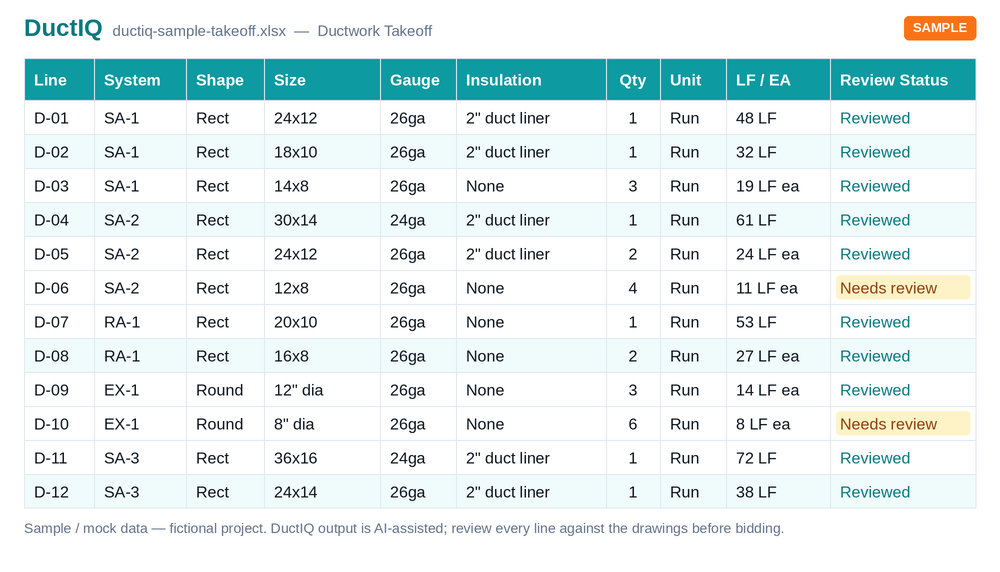
Download the sample takeoff (Excel)Or the CSV versionCheck any line's pounds by hand
Quantities for the bid, details for the shop
A sheet metal contractor needs two things from a drawing. To bid, you need duct linear feet by size and a fitting count. To fabricate, you need each fitting dimensioned with a gauge, a material, and a connection type. Most takeoff tools stop at the first and leave the shop to redraw everything.
DuctIQ carries the takeoff through to fabrication. The same measured duct and counted fittings become shop drawings with the callouts a fab shop actually cuts to.
Start your free takeoffOr download a real sample takeoff first
Fabrication-ready shop drawings
Each fitting drawing carries a fabrication spec — gauge, material, seam/connection, and quantity — and the cut dimensions in the A×B / C×D convention shops use. Where a gauge is not given on the drawing, DuctIQ shows the SMACNA minimum and labels it clearly as a minimum rather than a verified value, so nobody mistakes a default for a spec.
- Duct measured in linear feet by size.
- Fittings counted and rolled up by type and size.
- Per-fitting fab spec: gauge, material, seam, quantity.
- Cut dimensions in the A×B / C×D convention.
- SMACNA minimum gauge shown and labelled when the drawing does not specify one.
Worked example: from takeoff lines to sheet metal pounds
This is how a duct takeoff becomes a material list for the shop. Each line carries its size and linear feet; the gauge comes from the SMACNA minimum for that size when the drawings do not state one, and the weight is surface area times the gauge's pounds per square foot. The columns are computed with the same tables DuctIQ's takeoff and bid sheet use, so you can check any line by hand.
| Takeoff line | LF | SMACNA minimum gauge | lb/ft² (galvanized) | lb per LF | Raw metal, lb |
|---|---|---|---|---|---|
| Supply main 36x20 | 48 | 22 ga | 1.406 | 13.12 | 630 |
| Supply branch 24x12 | 85 | 24 ga | 1.156 | 6.94 | 590 |
| Return 30x16 | 60 | 24 ga | 1.156 | 8.86 | 532 |
| Branch 12x8 | 120 | 26 ga | 0.906 | 3.02 | 362 |
| Round spiral 18 in | 40 | 24 ga | 1.156 | 5.45 | 218 |
| Round spiral 10 in | 95 | 26 ga | 0.906 | 2.37 | 225 |
Illustrative quantities, not a customer job. Low-pressure (½ in w.g.) minimum gauges; geometric metal only, before seam, connector, reinforcement and waste allowances.
What the shop orders from it
Rolled up by gauge, the example comes to 26 ga 588 lb, 24 ga 1,339 lb, 22 ga 630 lb; 2,557 lb in total of raw galvanized metal. That roll-up is what a fabricator orders coil and sheet against, and it is why the gauge on every line matters as much as the linear feet.
The weights are geometric metal only. Seams, connectors, reinforcement and waste depend on how your shop builds, so apply your own allowance on top and keep it visible in the estimate. Where a spec calls for a heavier gauge than the SMACNA minimum, the stated gauge wins.
Check any line with the duct weight calculator
Fabrication output compared: DuctIQ, WenDuct and Canaveral
Two established names show up for this search, and both are serious sheet metal tools. Wendes has built mechanical estimating software since 1978; its WenDuct module covers rectangular, round and oval duct, fittings, hangers, gauges, joints and seams, with labor tied to per-piece labor studies, on-screen takeoff that auto-connects fittings, and, since 2026, Takso AI takeoff integrated into the platform. Canaveral's sheet metal takeoff carries a full construction profile on every run (pressure class, seam, gauge, reinforcement), places fittings automatically as you trace, prices by gauge and weight, and exports cut lists, weights by gauge, fitting schedules and hanger counts.
The honest difference is who reads the drawing. In both tools the estimator traces or assists the takeoff and the software does the fabrication arithmetic brilliantly. DuctIQ reads the mechanical PDF itself and returns the duct and fitting takeoff for you to review. Where a detail below is not in public materials, the cell says what to verify in a demo:
| Sheet metal output | WenDuct (Wendes) | Canaveral | DuctIQ |
|---|---|---|---|
| Who measures the duct | Estimator on-screen takeoff; Takso AI integration (verify scope in a demo) | Estimator traces runs, AI-assisted | The AI reads the PDF; the estimator reviews flagged lines |
| Fittings | Auto-connected during takeoff | Placed automatically from geometry as you trace | Derived from the traced runs, counted by type and size |
| Gauge and construction | Gauges, joints, seams in the estimate | Pressure class, seam, gauge, reinforcement per run | Spec gauge first, SMACNA minimum labelled when the drawing is silent |
| Weight | Material and labor pricing | Weights by gauge, coil vs flat | Pounds by gauge from published lb/ft² tables |
| Shop output | Estimate and bid summary | Cut lists, fitting schedules, hanger counts | Fitting shop drawings with gauge, material, seam and A×B / C×D cut dimensions |
| Labor | Per-piece labor studies, a core strength | Parts and labor pricing | Not included: quantities export for your own labor units |
| Try it | Contact Wendes for a demo | Contact Canaveral for a demo | Free takeoff of one sheet, no credit card |
Wendes and Canaveral details summarised from their public product pages in September 2026; confirm current features with each vendor.
Built for HVAC sheet metal, not generic takeoff
Because DuctIQ is purpose-built for HVAC ductwork, it understands the difference between a supply trunk and a return, a reducer and a tee, a rectangular run and a round one. That structure is what makes the takeoff usable for both the bid and the bench.
Run your first takeoff free
Upload a mechanical PDF and get a reviewable ductwork, fittings, and equipment takeoff you can export to Excel. No credit card to try your first drawing.
Built by a practicing P.Eng and principal of an Ontario mechanical contracting firm, for the estimators at that firm.
Start your free takeoff Download a sample takeoff See pricingNew to AI takeoff and want a hand? Send us your first drawing and we'll help you review the output, or book a 1:1 walkthrough.
Related HVAC takeoff guides
Further reading
- Manual Sheet Metal Tracing vs AI Ductwork Takeoff
- A Checklist for Reviewing an AI Ductwork Takeoff Before You Bid
Frequently asked questions
Does DuctIQ produce shop drawings or just quantities?
Both. You get reviewable duct and fitting quantities for the bid, and fabrication-ready shop drawings with gauge, material, and seam callouts for the shop.
Where does the gauge come from?
When the drawing or schedule specifies a gauge, DuctIQ uses it. When it does not, DuctIQ shows the SMACNA minimum for the size and labels it as a minimum so it is never mistaken for a verified spec.
What dimensioning convention do the drawings use?
Fittings are dimensioned in the A×B / C×D convention used on shop tickets, including both ends, length, and offsets where they apply.
Does it handle round (spiral) as well as rectangular?
Yes. Both rectangular and round/spiral duct and fittings are supported.
Can I export the quantities to Excel?
Yes. The takeoff exports to Excel and CSV for pricing and purchasing.
How is DuctIQ different from WenDuct or Canaveral?
Both are strong sheet metal estimating tools where the estimator drives the takeoff and the software handles fittings, construction and pricing; WenDuct adds per-piece labor studies and Canaveral adds cut lists and hanger counts. DuctIQ reads the mechanical PDF itself and returns the duct and fitting takeoff for review, then exports it. Many shops use DuctIQ for the takeoff and keep their estimating system for labor and pricing.
Does DuctIQ calculate sheet metal weight?
Yes. Each duct line carries pounds by gauge from published galvanized lb/ft² tables, the same ones behind DuctIQ's free duct weight calculator, so any line can be checked by hand.