A Focused PlanSwift Alternative for HVAC Takeoffs
Try AI Takeoff Free
No credit card · Upload a PDF in 10 seconds · Runs in your browser on Mac or Windows
Try AI Takeoff FreeSee an AI Takeoff in 10 Seconds
The sample is a real DuctIQ takeoff workbook: no signup. Plans and credits are on the pricing page.
PlanSwift is a well-established, capable general construction takeoff and estimating platform used across many trades. This is a fair comparison, not a takedown: if you take off concrete, framing, drywall, and mechanical all in one tool, PlanSwift's breadth is a real strength. The question this page answers is narrower — if your bids are mostly HVAC ductwork, is a purpose-built tool a better fit?
DuctIQ is built only for HVAC mechanical takeoff. Instead of giving you tools to measure anything by hand, it reads the mechanical PDF, measures the ductwork at scale, and hands back a reviewable takeoff. Here is where each tool makes sense, how the workflows differ, and how you would move between them.
What changed in 2026 — the dated facts
Comparison pages rot when they argue against last year's product, so here is PlanSwift's current state, dated and checkable. Per ConstructConnect's release notes of 2026-05-06, PlanSwift now ships Takeoff Boost in the mainline product: Auto Takeoff returns a page's linear, area, and count takeoff in seconds, joined by AI-powered Auto Count, with Auto Scale and AI Auto Name following over the summer on the wider platform. Takeoff Boost was announced on Google Cloud in April 2026, and a free trial requires no card.
Two things did not change: PlanSwift remains a Windows desktop application (DuctIQ runs in the browser on anything, Macs included), and its takeoff remains general-trade — linear, area, and count are geometry, with no duct fitting types, no gauge or seam logic, and no SMACNA weights. Everything below argues against that current product, not a strawman.
DuctIQ vs PlanSwift Takeoff Boost, at a glance
PlanSwift now ships Takeoff Boost in the mainline product — its May 2026 release notes list Auto Takeoff, which returns a page's linear, area, and count takeoff in seconds, joined by Auto Scale and AI-powered auto-naming. It is a real assist, and this page takes it seriously. The distinction that matters for HVAC is in the units: linear, area, and count are geometry, not ductwork — no gauge, no seams, no fitting types. Takeoff Boost speeds up a multi-trade takeoff you still interpret, while DuctIQ is a fully automated HVAC takeoff you review rather than build. In one line each:
- Workflow: PlanSwift + Takeoff Boost is AI-assisted clicking inside a manual takeoff; DuctIQ is upload the PDF and get the ductwork read, measured, and classified for you — no markup, no clicking runs.
- Time to first takeoff: PlanSwift means install, set up, and learn a multi-trade tool; DuctIQ means upload a mechanical PDF and review a reviewable takeoff in minutes, free on your first drawing.
- Export: both land in Excel, but DuctIQ exports structured columns (system, size, gauge, quantity) ready to price, instead of totals you organised by hand.
How DuctIQ's automated ductwork takeoff worksSee the Excel export format
Start your free takeoffOr download a real sample takeoff first
When PlanSwift makes sense
PlanSwift is the stronger choice when breadth matters. If a single estimator takes off multiple trades on the same job — earthwork, concrete, framing, finishes, and mechanical — a general platform that measures all of them in one place avoids juggling separate tools. It is mature, widely used, integrates with several estimating ecosystems, and there is a deep base of existing users and training material.
If your team already runs PlanSwift across the whole company and HVAC is one trade among many, the switching cost may not be worth it for the duct portion alone. That is a legitimate reason to stay.
When DuctIQ makes sense
DuctIQ makes sense when ductwork is the work, not a side trade. A general takeoff tool gives you a measure tool and leaves every duct run, fitting, and equipment tag as a manual click. DuctIQ does that reading and measuring for you and returns a structured, reviewable list.
If you are an HVAC or sheet metal estimator turning around mechanical bids, the time saved is in not hand-tracing every run. DuctIQ is deliberately narrower than PlanSwift — it will not take off your concrete — but for HVAC ductwork it gets you to a reviewable number faster.
- You bid mostly HVAC / sheet metal from mechanical PDFs.
- You want supply, return, and exhaust separated and grouped by size automatically.
- You want fittings counted and equipment pulled from schedules without manual entry.
- You want fabrication-ready shop drawings with SMACNA-aware gauge, material, and seam callouts.
- You price in Excel and want clean Excel/CSV export, not re-keying.
Workflow comparison
The core difference is who does the measuring. In a general takeoff tool the estimator drives every measurement; in DuctIQ the software measures and the estimator reviews.
General takeoff workflow: open the PDF, set the scale, select the duct tool, click along every run, switch tools to count fittings, read the equipment schedule by eye, and key each quantity into a bid sheet. DuctIQ workflow: upload the PDF, let it classify the sheets and measure the ductwork, review the line items (low-confidence ones are flagged), and export to Excel. Same destination, far fewer manual passes.
| Step | Manual / general takeoff (e.g. PlanSwift) | DuctIQ |
|---|---|---|
| Measure ductwork | Click along every run by hand after setting the scale | Read and measured automatically from the drawing at scale |
| Count fittings | Switch tools and tally each fitting manually | Counted automatically alongside the duct |
| Equipment schedules | Read by eye and re-key into the bid sheet | Pulled from the schedules into the takeoff |
| HVAC structure (SA/RA/EA, sizes) | Estimator organises it manually | Returned grouped by system and size |
| Excel / CSV output | Re-key totals into your workbook | Structured Excel/CSV export, ready to price |
| Trades covered | Many (concrete, framing, finishes, mechanical…) | HVAC / mechanical ductwork only — on purpose |
A fair, workflow-level comparison — not a knock on PlanSwift, which remains a capable multi-trade platform.
The HVAC-specific difference
A general tool measures geometry; it does not know a supply trunk from a return, a reducer from a tee, or how to read an equipment schedule. DuctIQ is built around that mechanical structure, so the takeoff comes back already organised the way you bid — by system, by size, with fittings and equipment in their own buckets.
It also carries through to fabrication: the same measured duct becomes shop drawings with gauge, material, and seam callouts, with the SMACNA minimum gauge shown and labelled when a drawing does not specify one. That is HVAC-specific output a general construction package is not designed to produce.
What about PlanSwift Takeoff Boost (AI)?
PlanSwift's Takeoff Boost is shipped, core product as of the May 2026 release: Auto Takeoff delivers a page of linear, area, and count takeoff in seconds, with Auto Scale and AI-powered auto-naming rounding out the suite. It is a real step up from clicking every item by hand, and if you are already in PlanSwift it is worth turning on.
The difference is what the AI understands. Takeoff Boost speeds up a general, multi-trade measure workflow — it is not built to know that a line is a 24x12 supply trunk, that a block in a schedule is an RTU, or how SA, RA, and EA should be separated. DuctIQ's AI is mechanical-specific end to end: it reads the drawing, groups duct by system and size, counts fittings, pulls equipment and air devices from the schedules, and carries through to SMACNA-aware shop drawings — then exports straight to Excel in fewer clicks than tuning a general AI pass for HVAC. If ductwork is the work, that specificity is the reason to reach past a general AI add-on.
On the dimensions that decide a ductwork takeoff, here is where a general AI assist and a ductwork-specialized tool land:
| For a ductwork takeoff | PlanSwift Takeoff Boost (general AI) | DuctIQ (ductwork-specialized) |
|---|---|---|
| Getting to a first pass | A first pass you set up and then review, inside a multi-trade tool | Upload the PDF and the takeoff comes back automatically; most sets in minutes |
| Duct grouped by system and size | Measures geometry; you organise SA/RA/EA and sizes yourself | Returned rolled up by system and size automatically |
| Fittings and equipment | Counted/placed by hand or a general count pass | Fittings counted and equipment read from the schedules by tag |
| Review and confidence flags | You decide what to re-check across the whole trade | Every line carries a Confidence level; low-confidence runs flagged for you |
| SMACNA-aware output | Not a mechanical-specific feature | Gauge, material, and seam callouts; SMACNA minimum labelled when a drawing is silent |
| Excel-ready deliverable | Export the measured quantities you organised | Structured .xlsx by system/size/gauge, ready to price |
A fair, capability-level view. Takeoff Boost is a real, useful general AI assist; the contrast is ductwork specialization, not a knock on PlanSwift.
Pricing: a published license cost vs pay-as-you-go
PlanSwift publishes its Professional plan at roughly US$2,000 per license per year, which their materials describe as including software updates, a year of support, and about two hours of training. There is also a perpetual-license route (commonly cited around US$1,600–$1,750 up front plus an annual maintenance fee). Pricing like this changes and can depend on configuration, so confirm the current terms with PlanSwift directly — the figures here are their published numbers at the time of writing, included only to anchor the comparison fairly.
DuctIQ is deliberately the opposite shape: transparent, pay-as-you-go subscription plans starting at US$29.99/month, with a free first takeoff and no per-seat license to buy before you can see the deliverable. You can also download a real sample output right now without an account. The point is not that one number is 'better' — a multi-trade shop may get more out of a general license — but that an HVAC estimator can try DuctIQ on a real drawing for nothing and scale spend with actual usage.
| PlanSwift (published) | DuctIQ | |
|---|---|---|
| Pricing model | ≈ US$2,000 / license / year (Professional) | From US$29.99/month, pay-as-you-go |
| Upfront commitment | Annual license per seat | None — run one takeoff free, no card |
| Time to first takeoff | Install, set up, ~2 hrs training included | Upload a PDF, reviewable takeoff in minutes |
| HVAC structure (SA/RA/EA, sizes) | You measure and organise it by hand | Returned grouped by system and size automatically |
| Native Excel / CSV export | Yes — you key the totals in | Yes — structured .xlsx/CSV, ready to price |
| Trades covered | Many (concrete, framing, finishes, mechanical…) | HVAC / mechanical ductwork only — on purpose |
PlanSwift figures are from their published Professional pricing at the time of writing and can change — confirm current terms with PlanSwift. DuctIQ pricing is on our pricing page.
Download sample takeoff (Excel)See DuctIQ pricing
Migration path
You do not have to rip anything out to try DuctIQ. Because it exports standard Excel and CSV, a DuctIQ takeoff drops into the same pricing workbook you use today — whether your numbers currently come from PlanSwift, another tool, or a spreadsheet. A practical migration is to run your next HVAC bid through both: take off the duct in DuctIQ, compare it against your usual process, and keep whichever you trust. Nothing about DuctIQ locks your historical estimates in.
How to review the takeoff (the QA is built in)
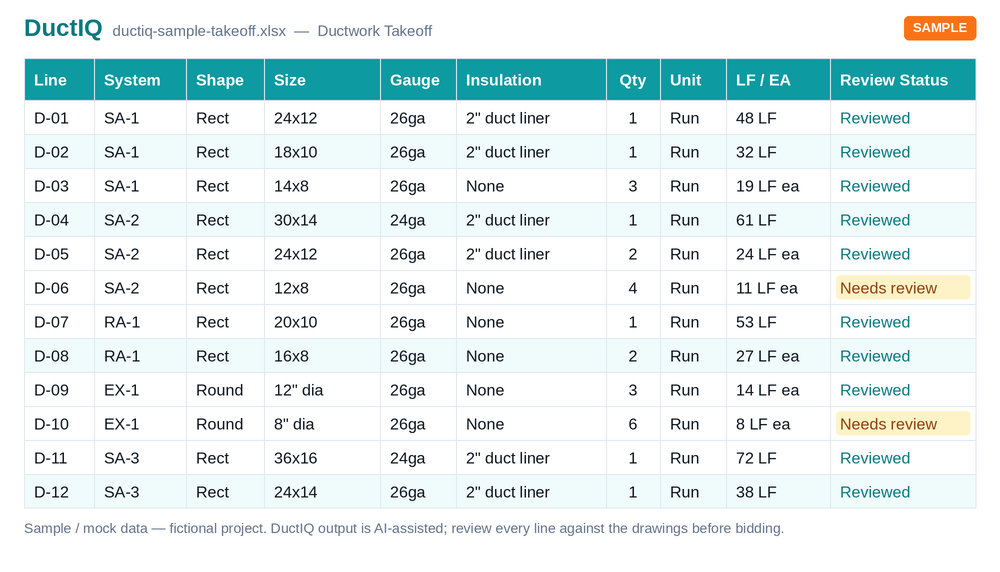
A general takeoff tool leaves both the measuring and the checking to you. DuctIQ automates the measuring and gives you a structured way to check it: every line carries a Confidence level and the AI's low-confidence runs are flagged, so reviewing is targeted rather than re-tracing the whole set.
This is the answer to "can I trust an automated number?" — you review named lines with a built-in status, confirm the flagged ones, and only then export. The pre-bid checklist below is how you work through it.
- A Confidence level on every line (Confirmed, Review or Flagged), so checking is targeted.
- Low-confidence runs flagged with a reason (no readable scale, missing size callout).
- Each quantity traces back to its source sheet, so any number is defensible.
- A review queue groups the uncertain lines so you check them first.
- You confirm or adjust before the Excel export — nothing is auto-submitted.
Your pre-bid QA checklist
PlanSwift leaves the measuring — and the checking — to you. DuctIQ automates the measuring, but you still own the bid, so the takeoff is built to be verified rather than trusted on faith. A headline 'capture accuracy' percentage tells you nothing about which lines to trust on your drawing; a reviewable, line-level takeoff with SMACNA-aware output and an export in the format your shop needs does. Five checks before a DuctIQ takeoff goes into a submitted bid:
- Scale — confirm DuctIQ read the title-block scale; spot-check one dimension you already know.
- Flagged lines — open every 'Needs review' item and confirm or fix it before it counts.
- System totals — sanity-check the largest trunks and total linear feet per system against your gut for the job.
- Equipment — reconcile RTU, VAV, and diffuser counts with the schedules, watching for tags repeated floor to floor.
- Gauge & insulation — check against the spec; where the drawing was silent DuctIQ labels the SMACNA minimum, so confirm it for your pressure class.
Download a sample reviewed takeoff (Excel)
Run your first takeoff free
Upload a mechanical PDF and get a reviewable ductwork, fittings, and equipment takeoff you can export to Excel. No credit card to try your first drawing.
Built by a practicing P.Eng and principal of an Ontario mechanical contracting firm, for the estimators at that firm.
Start your free takeoff Download a sample takeoff See pricingNew to AI takeoff and want a hand? Send us your first drawing and we'll help you review the output, or book a 1:1 walkthrough.
Related HVAC takeoff guides
Further reading
- Manual Sheet Metal Tracing vs AI Ductwork Takeoff
- How Accurate Is AI HVAC Takeoff Software?
- A Checklist for Reviewing an AI Ductwork Takeoff Before You Bid
Frequently asked questions
Is DuctIQ a drop-in replacement for PlanSwift?
For HVAC ductwork takeoff, DuctIQ replaces the manual measuring with an automatic, reviewable takeoff. It is not a general multi-trade platform — if you take off concrete, framing, and finishes in one tool, PlanSwift's breadth still has a place. DuctIQ is focused specifically on mechanical/HVAC.
Do I still have to click every duct run like in a general takeoff tool?
No. DuctIQ reads the mechanical drawing and measures the ductwork for you; you review and adjust the results rather than tracing each run by hand. That is the main workflow difference.
How is DuctIQ different from PlanSwift's Takeoff Boost AI?
Takeoff Boost is a general, multi-trade AI assist that speeds up measuring and counting as a first pass you still review. DuctIQ's AI is built specifically for HVAC: it separates supply, return, and exhaust, measures duct by size, counts fittings, and pulls equipment and air devices from the schedules, then carries the takeoff through to SMACNA-aware shop drawings and a clean Excel export. For mechanical work that specificity means fewer clicks to a number you can bid.
Can I move my estimates between PlanSwift and DuctIQ?
DuctIQ exports standard Excel and CSV, so its takeoff drops into the same pricing workbook you already use. There is no proprietary lock-in on the quantities, which makes running a bid through both for comparison straightforward.
Does DuctIQ produce shop drawings?
Yes — it produces fabrication-ready shop drawings with gauge, material, and seam callouts, and shows the SMACNA minimum gauge (clearly labelled) when a drawing does not specify one. That fabrication detail is HVAC-specific output.
How do I try DuctIQ without committing?
You can download a real sample takeoff with no account, and run a free first takeoff by uploading a mechanical drawing and reviewing the result before choosing a plan.
Is PlanSwift good for HVAC takeoff?
PlanSwift is a capable general takeoff tool and it can measure duct, but it treats a mechanical plan like any other surface — you set the scale and click every run, and it does not separate supply/return/exhaust or read equipment schedules for you. It works for HVAC; it just is not built around HVAC the way a mechanical-specific tool is.
What's the best PlanSwift alternative for HVAC contractors?
If your bids are mostly ductwork, the best alternative is a tool built only for HVAC mechanical takeoff. DuctIQ reads the mechanical PDF, measures the duct, counts fittings, pulls equipment from the schedules, and exports to Excel — so you review a takeoff instead of tracing every run. If you take off many trades in one tool, PlanSwift's breadth may still suit you better.