A Ductwork-Focused TaksoAI Alternative for HVAC Takeoff
TaksoAI (taksoai.com) is a newer AI takeoff tool that has moved into HVAC estimating, with a dedicated HVAC page and a headline that most plans process in under fifteen minutes, plus claims like recognising dozens of fitting types and measuring duct and pipe runs automatically. If you are weighing AI HVAC takeoff tools, it is a reasonable one to look at — and this is a fair comparison, not a takedown. Fast processing is a genuine benefit, and every estimator feels the bid-window crunch.
DuctIQ is also AI takeoff, built narrowly around HVAC ductwork: it reads the mechanical PDF, measures supply, return, and exhaust at scale, counts fittings, pulls equipment from the schedules, and hands back a line-by-line reviewable takeoff you export to Excel or CSV. Below is how to compare the two on the things that actually decide a takeoff tool — speed, but also reviewability, coverage, and export — so you can judge either one against your own drawings.
Start your free takeoffSee pricing
No credit card — your first takeoff is free. Want proof first? Download a real sample takeoff — no signup.
When TaksoAI makes sense
TaksoAI makes sense if a fast, hands-off AI takeoff is your priority and its coverage fits the plan types you bid. Speed is the headline, and on a tight bid window that matters. As with any AI takeoff tool, the right move is to trial it on your own mechanical drawings and confirm the output holds up on the runs, fittings, and equipment you actually price — the speed claim is only useful if the quantities are right for your work.
If its HVAC algorithm handles your drawing styles well and the export lands cleanly in your estimating workflow, it is a legitimate option. We would rather you pick the tool that fits your jobs than oversell ours.
When DuctIQ makes sense
DuctIQ makes sense when ductwork is the work and you want speed without a black box. It is built specifically for HVAC mechanical takeoff, so the output comes back organised the way an estimator bids — supply, return, and exhaust separated by size, fittings counted, equipment pulled from the schedules — and every quantity is a reviewable line item rather than a single trust-me total.
- You bid mostly HVAC / sheet metal from mechanical PDFs and want the takeoff structured by system and size.
- You want every line reviewable, with low-confidence runs flagged and each quantity traceable to its source sheet.
- You want fittings counted and equipment pulled from schedules, not just duct linear feet.
- You want fabrication-ready shop drawings with SMACNA-aware gauge, material, and seam callouts.
- You price in Excel and want clean Excel/CSV export, not re-keying off a screen.
How to compare AI HVAC takeoff tools
Speed is one axis, not the whole decision. The same short checklist works on any AI takeoff tool — TaksoAI, DuctIQ, or the next one — so run it on each and keep whichever wins on your drawings. Here is what to weigh and where DuctIQ lands on each.
| What to compare | Why it matters | DuctIQ |
|---|---|---|
| Processing speed | A short bid window rewards fast turnaround | Most mechanical sets process in minutes — many well under ten — then review and export follow |
| Reviewability | AI can be confidently wrong, so you need to see every quantity | Every line shown with a status; low-confidence items flagged, not buried |
| Coverage beyond duct | A bid needs fittings and equipment, not just linear feet | Fittings counted and equipment pulled from the schedules with tags |
| Fabrication output | The shop needs gauge, material, and seam — not only quantities | SMACNA-aware shop drawings carry the takeoff through to the bench |
| Export | You price in Excel; re-keying invites transcription errors | Structured Excel/CSV export, ready for your bid sheet |
| Trial friction | You should see the deliverable before paying | Download a real sample with no account; run a free first takeoff |
A fair, criteria-level checklist — use it on any AI takeoff tool, including TaksoAI, against your own drawings.
Speed without a black box
The risk with a pure speed pitch is a fast, confident, wrong number. DuctIQ processes most sets in minutes too — many well under ten — but the design priority is that the speed never costs you control of the bid. Every quantity is a reviewable line item with a status, low-confidence runs are surfaced for a second look, and each line traces back to the sheet it came from. That per-line review and traceability is the difference between a number you can defend to a GC and one you have to take on faith.
Download a sample takeoff (Excel)How DuctIQ measures ductwork
See the review workflow, not just the speed claim
A fast takeoff is only worth having if you can check it, which is why DuctIQ shows its work. The "speed without a black box" idea above is concrete on the screen: every quantity is a line with a Review Status, and the runs the AI was unsure about are flagged for a second look.
This is the estimator-control wedge made visible. You are not trusting a capture percentage; you are reviewing named lines, each tied back to the sheet it came from, before anything reaches your bid.
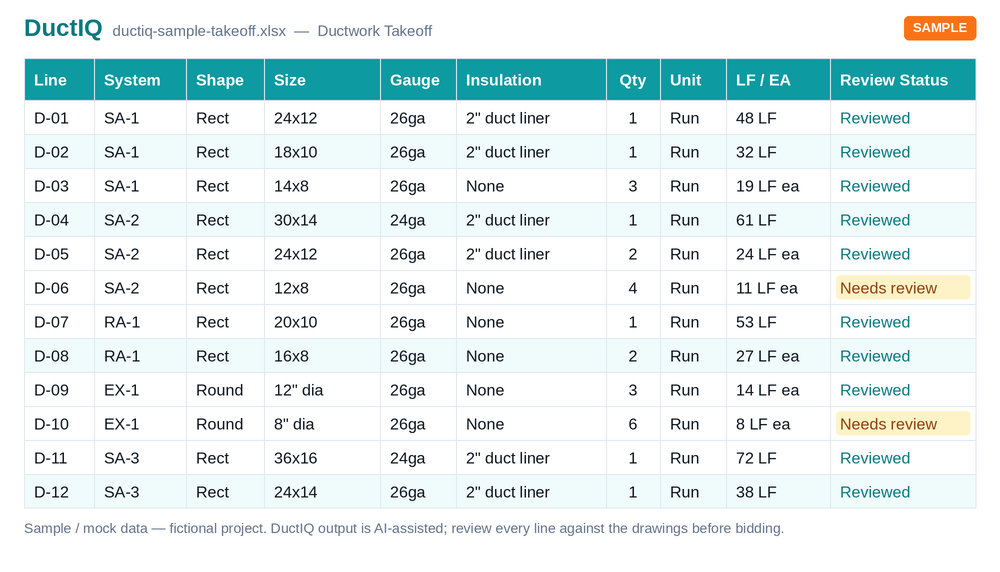
- Review Status on every line: "Reviewed" or "Needs review".
- Low-confidence runs flagged with a reason, so review is targeted rather than a full re-check.
- Each quantity traces to its source sheet for verification.
- A review queue surfaces the uncertain lines first.
- You confirm or adjust before exporting to Excel or CSV.
Try both, keep what you trust
You do not have to commit blind. Download a real DuctIQ sample output right now with no account, then run a free first takeoff on one of your own drawings. A practical evaluation is to push your next HVAC bid through both DuctIQ and TaksoAI and compare the duct quantities, the fittings and equipment, and how clean the export is. Because DuctIQ exports standard Excel and CSV, nothing is locked in — the takeoff drops into the same pricing workbook you already use.
Try a free HVAC takeoffDownload sample (CSV)See DuctIQ pricing
QA checklist: what to verify before bidding
TaksoAI leads with a 'Next-Gen Duct Algorithm' and a processing-time headline. Speed and a clever algorithm are good, but you bid from quantities you have checked, not from a version number or a capture percentage. DuctIQ is built so the checking is fast and visible: line-level review, SMACNA-aware fabrication callouts, and an Excel/CSV export your estimating software ingests as-is. Five checks before a DuctIQ (or any AI) takeoff goes into a bid:
- Scale — confirm DuctIQ read the sheet's scale correctly; spot-check a known dimension.
- Review flags — resolve every 'Needs review' line instead of relying on an accuracy average.
- Totals — sanity-check the biggest trunks and per-system linear feet against the job.
- Schedules — verify equipment and diffuser counts, watching for tags repeated across floors.
- Spec — confirm gauge and insulation to the project spec; the SMACNA minimum is labelled where the drawing is silent.
Download a sample takeoff (Excel)
Run your first takeoff free
Upload a mechanical PDF and get a reviewable ductwork, fittings, and equipment takeoff you can export to Excel. No credit card to try your first drawing.
Start your free takeoff Download a sample takeoff See pricingNew to AI takeoff and want a hand? Send us your first drawing and we'll help you review the output, or book a 1:1 walkthrough.
Related HVAC takeoff guides
Further reading
- How AI Reads a Mechanical Drawing for Duct Takeoff
- How Accurate Is AI HVAC Takeoff Software?
- Manual Sheet Metal Tracing vs AI Ductwork Takeoff
Frequently asked questions
Is DuctIQ a drop-in replacement for TaksoAI?
For HVAC ductwork takeoff, DuctIQ does the same core job — AI reads the mechanical drawing and returns measured quantities — but it is purpose-built for mechanical work and emphasises line-by-line reviewability and SMACNA-aware fabrication output. The best way to decide is to run the same drawing through both and compare the takeoffs.
How does DuctIQ's speed compare to TaksoAI's under-15-minutes claim?
DuctIQ also processes most mechanical sets in minutes — many well under ten — after which you review and export. Denser or scanned sets take longer. Rather than competing only on a stopwatch, DuctIQ optimises for time to a takeoff you trust: fast processing followed by a quick review, with low-confidence items flagged.
Does DuctIQ export to Excel and CSV like TaksoAI?
Yes. The full takeoff — duct, fittings, and equipment — exports to Excel (.xlsx) or CSV with structured columns, so it drops into your pricing workbook or another estimating system without re-keying.
What does DuctIQ do beyond measuring duct?
It counts fittings, pulls equipment from the drawing's schedules with tags, and produces fabrication-ready shop drawings with gauge, material, and seam callouts — using the SMACNA minimum gauge, clearly labelled, when a drawing does not specify one.
How do I try DuctIQ without committing?
Download a real sample takeoff with no account, then run a free first takeoff by uploading a mechanical drawing and reviewing the result before choosing a plan.
Is TaksoAI built specifically for HVAC?
TaksoAI is a broader AI takeoff/estimating tool that markets full-scope takeoffs across trades. DuctIQ is built only for HVAC mechanical — it separates supply, return, and exhaust, sizes duct, counts fittings, reads equipment schedules, and produces SMACNA-aware shop drawings. If ductwork is the bulk of your work, that mechanical depth is the difference.
What's the best TaksoAI alternative for HVAC ductwork?
For mechanical contractors, the best alternative is a tool focused on HVAC takeoff rather than all-trades. DuctIQ returns reviewable ductwork, fittings, and equipment from your mechanical PDFs and exports to Excel/CSV. Run the same drawing through both and keep the takeoff you trust.