A Canaveral.ai Alternative You Can Review Line by Line
Try AI Takeoff Free
No credit card · Upload a PDF in 10 seconds · Runs in your browser on Mac or Windows
Try AI Takeoff FreeSee an AI Takeoff in 10 Seconds
The sample is a real DuctIQ takeoff workbook: no signup. Plans and credits are on the pricing page.
Canaveral.ai is a new AI-native estimating entrant for mechanical work — it markets AI-powered takeoff for mechanical estimators covering duct, pipe, and equipment, with automatic fittings and SMACNA-compliant weights. New tools deserve a fair look, and this page is a comparison, not a takedown: if Canaveral's scope fits your shop, evaluate it properly.
DuctIQ's difference is that you can verify everything before you commit. It is shipping, self-serve HVAC ductwork takeoff with published pricing: upload a mechanical PDF, get every duct run, fitting, air device, and piece of equipment back as a reviewable line item, and export to Excel or CSV in one click. You can download a real sample takeoff below without creating an account — the strongest claim any takeoff tool can make is output you can inspect yourself.
Who Canaveral.ai is, and what this page compares
Canaveral.ai launched its mechanical takeoff positioning in 2026, describing itself as the first AI-native estimating platform for mechanical trades: duct, pipe, and equipment takeoff with automatic fitting insertion, SMACNA-compliant weight tables, a parts database with labour rates, and drawing-reading conveniences like its "hold Q" duct-size suggestion. That is an ambitious, specific feature list for a young product — check canaveral.ai for the current state, since it moves fast.
This page compares what a buyer can verify today. DuctIQ is in production for HVAC ductwork takeoff: the sections below show the review workflow, the export, and the pricing, and finish with a set of demo questions worth asking any new AI takeoff tool — Canaveral included — before you put it on a live bid.
When Canaveral might make sense
If your estimating need spans mechanical piping as well as ductwork and you want one AI tool attempting the whole mechanical scope, Canaveral's stated coverage is broader than DuctIQ's deliberate focus. Early adopters also sometimes get pricing flexibility and direct influence on a young product's roadmap — real advantages if you have the patience for a tool that is still finding its shape.
The honest trade-off with any brand-new entrant is maturity: the drawing styles it has seen, the edge cases it has hardened against, and the review tooling around the AI are all still being built. That is not a criticism of Canaveral specifically — every tool, DuctIQ included, started there. It is a reason to demo with your own drawings rather than a demo set.
Start your free takeoffOr download a real sample takeoff first
When DuctIQ makes sense
DuctIQ makes sense when ductwork is the work and you want a takeoff you can stand behind today. It is purpose-built for HVAC sheet metal: supply, return, and exhaust separated and grouped by size, fittings counted, equipment and air devices pulled from the schedules, and SMACNA-aware gauge and fabrication output.
- You want to see the deliverable before signing up — the sample Excel below is the actual output format.
- You want every quantity as a reviewable line item with low-confidence reads flagged, so the audit happens before the export, not after the bid.
- You want one-click Excel/CSV out — structured columns that drop into your pricing workbook with no re-keying and no proprietary lock-in.
- You want published, monthly pricing you can budget without a sales call.
- You want SMACNA-aware gauge and weight handling where any assumption is labelled, not hidden.
Workflow comparison
Both products promise AI reading of mechanical drawings; the comparison that matters is what you can verify at each step. Where Canaveral's workflow details are not public, the honest cell is "verify in a demo" — ask to see it live on your own drawing set.
| Step | Canaveral.ai (verify in a demo) | DuctIQ (verifiable today) |
|---|---|---|
| See the output first | Ask for a sample deliverable from your own drawing | Download the sample Excel/CSV below — no account needed |
| Takeoff | AI duct, pipe, and equipment takeoff with automatic fittings (as marketed) | Self-serve AI ductwork takeoff — duct runs, fittings, devices, equipment — in minutes |
| Review | Ask how line-level review and low-confidence flagging work | Every line has a Confidence level; uncertain reads are flagged with a reason and queued first |
| Export | Ask what formats export and how columns are structured | One-click Excel (.xlsx) or CSV — system, size, gauge, quantity — into your bid sheet |
| Pricing | Not published in detail at the time of writing — confirm on canaveral.ai | Published monthly plans from $29.99, cancel anytime |
A fair comparison under uncertainty: Canaveral is new and its public detail is thin, so the left column is what to verify rather than a claim about what it lacks. DuctIQ's column you can check yourself today.
The review screen: audit every line before it exports
"AI-native" is a starting point, not a guarantee — the question an estimator actually needs answered is which lines to trust. DuctIQ's answer is a review screen built into the takeoff itself: every duct run, fitting, air device, and piece of equipment comes back as a line item with a Confidence level, and the reads the AI was less confident about are flagged with a reason and grouped so you clear them first.
Nothing is a trust-me total. Each line traces to its source sheet, you confirm before anything exports, and the takeoff you hand to pricing is one a human has audited — yours.
- A Confidence level on every line (Confirmed, Review or Flagged) at a glance.
- Low-confidence reads flagged with the reason (unreadable scale, missing size callout), so you know why to look.
- A review queue surfaces the uncertain lines first instead of burying them in the totals.
- Line-to-sheet traceability, so any number can be defended to a GC.
One-click Excel and CSV, and a sample you can open right now
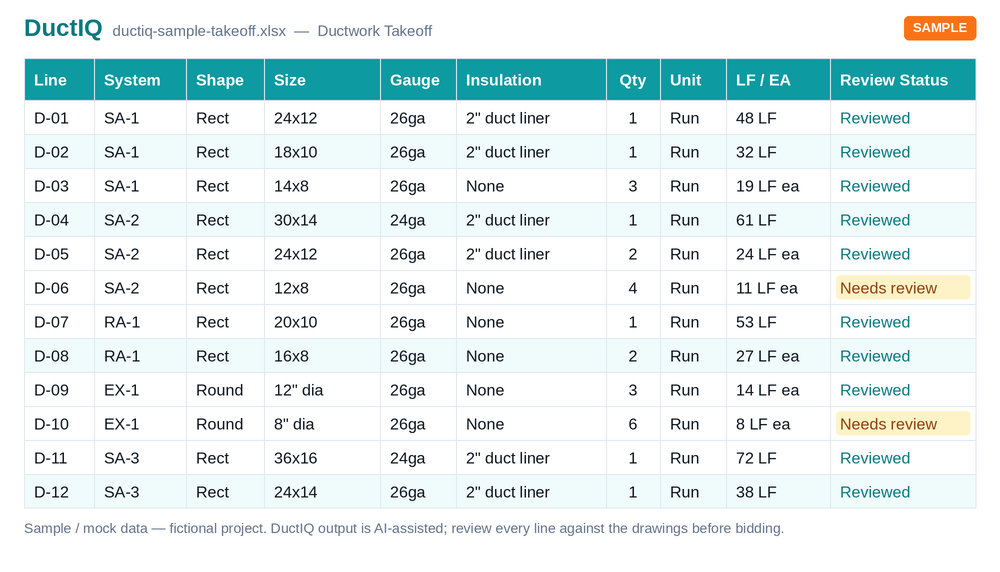
The deliverable is a priceable file, not a dashboard. DuctIQ exports the full takeoff to Excel or CSV in one click with structured columns — system, size, gauge, linear feet, fitting and equipment counts — so it lands in the workbook your pricing already lives in. There is no proprietary format between you and your numbers.
Judge the format yourself before creating an account: the sample below is generated by the real export pipeline.
Download the sample takeoff (Excel)Download the CSV versionHow the Excel export is structured
SMACNA weights: both claim it — DuctIQ shows its work
Canaveral markets SMACNA-compliant weight tables and automatic fitting insertion, and DuctIQ is SMACNA-aware too — so the differentiator is not the acronym, it is transparency. In DuctIQ, gauge follows the project specification when the drawings provide it, and where a spec is silent the SMACNA-minimum fallback is applied and labelled as such on the line, never silently assumed. Weight and sheet-metal totals come from published galvanized lb/ft² tables — the same ones behind our free duct weight calculator, where you can check any line's pounds by hand — and they inherit from gauge you can see and override, which means the number that reaches your bid is one you can explain.
On the four dimensions where the two products' claims overlap most directly, here is where each stands — Canaveral's column from its public materials, DuctIQ's from what you can verify on this site today:
| Claim, side by side | Canaveral.ai (per its materials — verify in a demo) | DuctIQ (verifiable today) |
|---|---|---|
| SMACNA gauge & weight source | SMACNA-compliant weight tables (methodology not published) | Spec gauge first; labelled SMACNA minimum otherwise; pounds from published lb/ft² tables you can check on our duct weight calculator |
| Fittings: auto-insert vs audited | Automatic fitting insertion | Fittings derived from the traced runs AND every count a reviewable line — flags with reasons, confirm before export |
| Excel/CSV export detail | Export capabilities not detailed publicly — ask for the file | One-click .xlsx/CSV: duct by system/size/gauge, typed fittings, equipment, weights; sample downloadable with no account |
| Pricing model | Not published in detail at the time of writing | Published: $29.99–$99.99/month, cancel anytime, free first takeoff |
Fair under uncertainty: where Canaveral's public materials are silent, the cell says what to ask for rather than claiming a gap. Every DuctIQ cell links to something you can inspect right now.
DuctIQ's SMACNA-aware takeoff in detailCheck the weight math yourself
Seven demo questions to ask any new AI takeoff tool
New entrants appear in this category every quarter now, and marketing pages converge on the same phrases — AI-native, automatic fittings, SMACNA weights. These questions separate a shipping workflow from a roadmap, and they are fair to ask of anyone, DuctIQ included:
- Run my own drawing set live, not a demo set — mechanical drawings vary too much for a curated sheet to prove anything.
- Show me a single duct run from detection to export: where do I see it, edit it, and trace it to its sheet?
- What happens to low-confidence reads — are they flagged for review or absorbed into the totals?
- Where does gauge come from, and how is a spec-vs-SMACNA-minimum conflict shown?
- What exactly does the Excel/CSV export contain? Ask for the file, not a screenshot.
- What is the pricing, in writing, including overage or per-project charges?
- Can I run a real project free before committing?
Start your free takeoffSee pricing & plans
Run your first takeoff free
Upload a mechanical PDF and get a reviewable ductwork, fittings, and equipment takeoff you can export to Excel. No credit card to try your first drawing.
Built by a practicing P.Eng and principal of an Ontario mechanical contracting firm, for the estimators at that firm.
Start your free takeoff Download a sample takeoff See pricingNew to AI takeoff and want a hand? Send us your first drawing and we'll help you review the output, or book a 1:1 walkthrough.
Related HVAC takeoff guides
Frequently asked questions
What is Canaveral.ai?
Canaveral.ai is a new AI-native estimating product for mechanical contractors, launched in 2026, marketing AI takeoff for duct, pipe, and equipment with automatic fittings and SMACNA-compliant weights. It is early, so check canaveral.ai directly for current capabilities and pricing.
Is DuctIQ a direct alternative to Canaveral.ai?
For the HVAC ductwork portion of mechanical estimating, yes — DuctIQ does self-serve AI takeoff of duct runs, fittings, air devices, and equipment with line-by-line review and Excel/CSV export, and it is in production today. Canaveral also markets pipe takeoff, which is outside DuctIQ's deliberate ductwork focus.
Does DuctIQ handle mechanical pipe takeoff?
No — DuctIQ is purpose-built for HVAC ductwork and sheet metal: duct by system and size, fittings, air devices, and equipment from the schedules. If piping is the majority of your takeoff work, a broader mechanical tool may fit better; many shops pair a focused duct tool with their existing pipe workflow.
How does DuctIQ's review compare to a new AI tool's?
DuctIQ returns every quantity as a line item with a Confidence level, flags low-confidence reads with the reason, and queues them for you to clear before export — with each line traceable to its source sheet. Whatever tool you evaluate, ask to see that same audit trail live on your own drawings.
What does DuctIQ cost compared to Canaveral?
DuctIQ's pricing is published: monthly plans from $29.99 to $99.99 with no annual lock-in, plus non-expiring credit top-ups. Canaveral did not list detailed public pricing at the time of writing — confirm on their site and get any figure in writing during a demo.
Can I try the output before signing up for either tool?
With DuctIQ, yes, twice over: download the sample Excel/CSV takeoff with no account, then run a free first takeoff on your own mechanical drawing and review it line by line before choosing a plan. Asking a new entrant for the same two things is a reasonable bar.
Does DuctIQ use SMACNA-compliant duct weights?
Yes. Gauge is resolved per run — from the project specification when the drawings state it, and from the SMACNA low-pressure minimum tables when they don't, in which case the line is labelled as a SMACNA minimum rather than silently assumed. Sheet-metal pounds are computed from published galvanized lb/ft² weights by gauge, the same tables behind DuctIQ's free duct weight calculator, so any line's weight can be checked by hand.