HVAC Takeoff Software Built for Mechanical Contractors
Try AI Takeoff Free
No credit card · Upload a PDF in 10 seconds · Runs in your browser on Mac or Windows
Try AI Takeoff FreeSee an AI Takeoff in 10 Seconds
The sample is a real DuctIQ takeoff workbook: no signup. Plans and credits are on the pricing page.
DuctIQ is HVAC takeoff software that turns mechanical PDF drawings into a structured, reviewable takeoff. Instead of scaling ducts by hand or clicking every run in a generic estimating tool, you upload the drawing set and get supply, return, and exhaust ductwork measured in linear feet, plus fittings and equipment pulled from the schedules.
It is built specifically for HVAC and mechanical contractors — not adapted from a generic construction takeoff package — so the output speaks in the units an estimator actually bids: duct sizes, linear feet, fitting counts, and equipment tags.
Upload a mechanical PDF — this is what comes back
Before any workflow talk, the deliverable itself. This is the takeoff DuctIQ returns from a mechanical drawing set — duct by system and size with linear feet, fittings counted by type, equipment from the schedules, and a Confidence level on every line so the uncertain reads are impossible to miss:
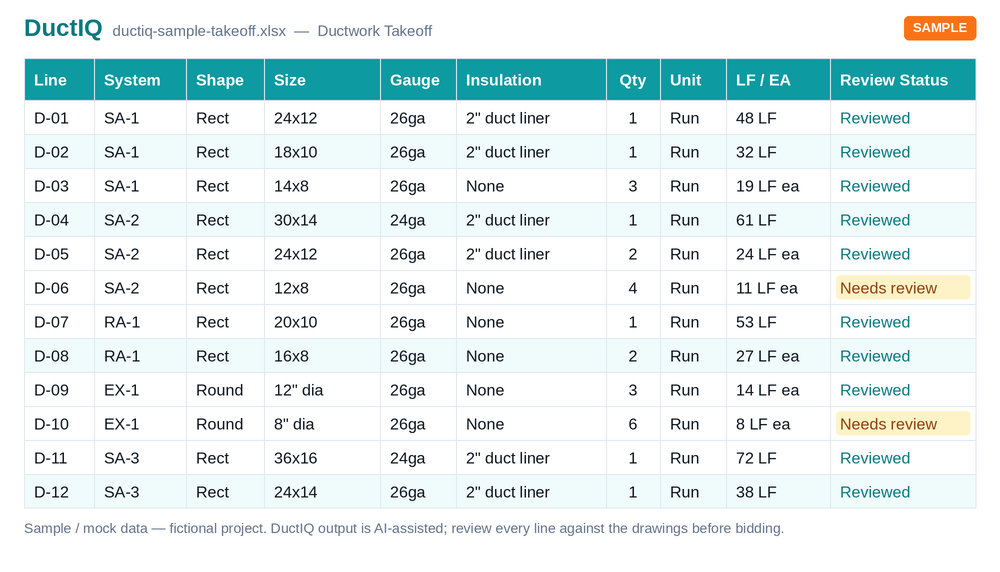
Download this sample takeoff (Excel)Or the CSV versionEvery export column, documentedThe full mechanical takeoff workflow
The problem with manual HVAC takeoffs
A mechanical takeoff done by hand is slow and easy to get wrong. You scale every duct run, tally fittings, cross-reference equipment schedules, and re-key everything into a spreadsheet. On a multi-page set that is hours of work per bid, and a single missed run or transposed size can swing a number enough to lose the job or win it at a loss.
Generic on-screen takeoff tools speed up the clicking but still leave the estimator doing all of the interpretation. They do not know what a duct is, what a return looks like, or how to read an equipment schedule — so every measurement is still a manual decision.
Start your free takeoffOr download a real sample takeoff first
How DuctIQ does an HVAC takeoff
DuctIQ reads the drawing the way an estimator does, then hands the result back for review. The workflow is short:
- Upload your mechanical PDF drawing set — single sheet or multi-page.
- DuctIQ classifies the sheets, finds the ductwork, and measures supply, return, and exhaust runs in linear feet using the drawing's own scale.
- Fittings and equipment are pulled together with the duct quantities into one line-item takeoff.
- Every line is shown for review so you can verify or adjust before it goes into your bid.
- Export the finished takeoff to Excel or CSV and drop it straight into your estimate.
What you get back
The output is a reviewable takeoff, not a black box. Ductwork is broken out by system and size, fittings are counted, and equipment is listed from the schedules. Because every quantity is visible line by line, an estimator stays in control — DuctIQ does the reading and measuring, you do the judgement.
Need the fab side too? DuctIQ also produces fabrication-ready shop drawings with SMACNA-aware gauge, material, and seam callouts, so the same takeoff can feed the shop, not just the bid.
How to review the takeoff before you bid
Automated does not mean unaccountable, and this is the part buyers ask about most. DuctIQ hands back a takeoff you review, not a number you take on faith. Every duct run, fitting, and piece of equipment lands as its own line with a Confidence level, and anything the AI was unsure about is flagged for you rather than folded silently into a total.
The review is built into the tool and instant, so you are not waiting on a separate QA pass or a next-day hand-off. You open the takeoff, work the flagged lines first, confirm the rest, and export.
- A Confidence level on every line (Confirmed, Review or Flagged), so you can see at a glance what still needs eyes.
- Low-confidence runs are flagged with a reason, such as a sheet with no readable scale or a missing size callout.
- Each quantity traces back to the sheet it came from, so you can verify it against the drawing or defend it to a GC.
- Flagged items are grouped into a review queue, so you check the uncertain lines first instead of hunting for them.
- Nothing is auto-submitted: you confirm or adjust the quantities before they go into your bid and export to Excel.
How the ductwork itself is measured
Who it is for
DuctIQ fits solo estimators who need to turn bids around faster, and mechanical contractors who want consistent takeoffs that do not depend on one person's spreadsheet. If you bid HVAC ductwork from mechanical drawings, it is built for your workflow.
Coming from a general takeoff package? See how DuctIQ compares on price and time-to-takeoff against PlanSwift, or use the buyer's guide to pick the right category for your shop.
DuctIQ vs PlanSwift: price & time savedBest HVAC takeoff software: buyer's guide
How the AI actually reads a drawing
Under the hood, DuctIQ combines computer vision with mechanical knowledge. Machine-learning blueprint tracing locates the ductwork on each plan sheet, follows linear duct runs at the drawing's scale, and separates supply, return, and exhaust so the footage lands in the right bucket. AI-powered sheet metal counting then tallies the fittings — elbows, tees, transitions, taps — and the equipment and diffuser schedules are read to pull RTUs, VAV boxes, and air devices into the same takeoff.
Because the model works from the mechanical structure of the drawing rather than generic geometry, it knows a 24x12 line is a supply trunk and that round and rectangular duct buy and fabricate differently — distinctions a general AI measure tool leaves you to sort out by hand.
- Computer vision traces linear duct runs at scale.
- Supply, return, and exhaust separated automatically.
- AI-powered sheet metal counting for fittings (elbows, tees, transitions).
- Diffusers, VAV boxes, and equipment read from the schedules.
- Round and rectangular duct handled distinctly, by size and diameter.
Reviewable by design — never a black box
The danger with any AI takeoff is a confident wrong number. DuctIQ is built so that can't slip through silently: every quantity comes back as a line item you can see and check, and anything the model is unsure about — a sheet whose scale it can't confirm, a run it couldn't fully trace — is surfaced for review rather than quietly included. The estimator stays the final authority on what goes into the bid.
That review-first design is why an AI takeoff is faster without being riskier: the machine does the rote reading-and-measuring, and you spend your time verifying the handful of items that need a human eye, not redrawing the whole set.
An AI measure tool built for ductwork, not everything
If you've searched for an AI measure tool, an AI takeoff tool, or a way to measure ductwork from a PDF automatically, the gap you've probably hit is that the generic ones measure shapes. They'll hand back lengths and areas, but they don't know a supply trunk from a return branch or a tap from a transition. DuctIQ is an AI measuring tool tuned to one trade — it measures HVAC ductwork in the terms an estimator bids, not as anonymous lines on a page.
So the output isn't a pile of dimensions to interpret afterwards. Duct comes back as linear feet by size and system, fittings as counts, and equipment from the schedules — automatic duct takeoff that lands ready to price. That's the difference between a ruler that happens to be automated and a takeoff that understands mechanical work.
AI HVAC takeoff vs a manual / legacy takeoff
A legacy takeoff — whether it's PDF markup or a general multi-trade estimating package — puts the measuring on you: you set the scale, click every run, key every fitting, and organise the totals yourself. The software is a faster ruler. An AI HVAC takeoff inverts that: the software reads the drawing and produces the structured quantities, and you review them.
| Step | Manual / legacy takeoff | DuctIQ AI takeoff |
|---|---|---|
| Find the HVAC sheets | You page through the set | Mechanical sheets classified automatically |
| Measure duct runs | Scale and click each run by hand | Computer vision traces runs at scale |
| Count fittings | Eyeball and tally manually | AI-powered sheet metal counting |
| Diffusers & equipment | Read schedules and key them in | Pulled from the schedules automatically |
| Organise by system & size | You sort it after measuring | Returned grouped by SA/RA/EA and size |
| Export for pricing | Rebuild the list in Excel | One-click Excel / CSV export |
A workflow-level comparison: the difference is who does the measuring, not effort. The estimator still owns pricing and judgement.
Download a real sample takeoffDuctIQ vs legacy takeoff tools
Run your first takeoff free
Upload a mechanical PDF and get a reviewable ductwork, fittings, and equipment takeoff you can export to Excel. No credit card to try your first drawing.
Built by a practicing P.Eng and principal of an Ontario mechanical contracting firm, for the estimators at that firm.
Start your free takeoff Download a sample takeoff See pricingNew to AI takeoff and want a hand? Send us your first drawing and we'll help you review the output, or book a 1:1 walkthrough.
Related HVAC takeoff guides
Further reading
- How AI Reads a Mechanical Drawing for Duct Takeoff
- How Accurate Is AI HVAC Takeoff Software?
- How Long Does an HVAC Takeoff Take?
Frequently asked questions
What file formats does DuctIQ accept?
DuctIQ works from mechanical PDF drawings — the same plan sets you already receive for bidding. You can upload single-sheet or multi-page drawing sets.
Does it replace the estimator?
No. DuctIQ does the reading and measuring and returns a reviewable line-item takeoff. The estimator verifies and adjusts the quantities before they go into a bid, so you stay in control of the number.
Can I export the takeoff to Excel?
Yes. Every takeoff exports to Excel or CSV so you can drop the quantities straight into your existing estimate or bid sheet.
Does it handle multi-page drawing sets?
Yes. DuctIQ classifies the sheets in a set, processes the mechanical plan sheets, and reconciles the results into one takeoff.
Is DuctIQ only for ductwork?
Ductwork is the core. DuctIQ measures supply, return, and exhaust duct, counts fittings, and lists equipment from the schedules. It is purpose-built for HVAC/mechanical work rather than general construction takeoff.
What does the AI actually do to my drawing?
It reads the mechanical PDF with computer vision: it classifies the HVAC sheets, traces the duct runs at the drawing's scale, separates supply/return/exhaust, counts fittings, and reads the equipment and diffuser schedules — then returns all of it as reviewable line items.
Will the AI invent quantities it can't read?
No. When DuctIQ can't confirm a sheet's scale or fully trace a run, it flags those items for review instead of fabricating a number. Nothing is silently included.
Can AI measure ductwork from a PDF?
Yes. DuctIQ reads the mechanical PDF, traces the duct runs at scale with computer vision, and returns the footage as linear feet by system and size — no manual scaling or clicking each run, and no pile of anonymous lengths to reinterpret like a general AI measure tool returns. Anything it can't confirm is flagged for review rather than guessed.