Mechanical Takeoff Software for HVAC Contractors
Try AI Takeoff Free
No credit card · Upload a PDF in 10 seconds · Runs in your browser on Mac or Windows
Try AI Takeoff FreeSee an AI Takeoff in 10 Seconds
The sample is a real DuctIQ takeoff workbook: no signup. Plans and credits are on the pricing page.
Mechanical takeoff covers a lot of ground — piping, plumbing, and HVAC all live under it — and DuctIQ does the HVAC ductwork part better than a general tool can, because it does only that. Upload the mechanical drawings and DuctIQ measures the ductwork at scale, counts fittings, and pulls equipment from the schedules, returning a reviewable takeoff you can price.
Proof first, pitch second: the section below shows the actual deliverable — the components a takeoff covers, the review flags an estimator works from, and the real Excel/CSV file, downloadable without an account.
The deliverable, before the sales copy
This is the real output of a DuctIQ mechanical takeoff — the same structured sheet the export pipeline produces, with the AI's per-line review status baked in so you can see exactly what an estimator confirms before pricing:
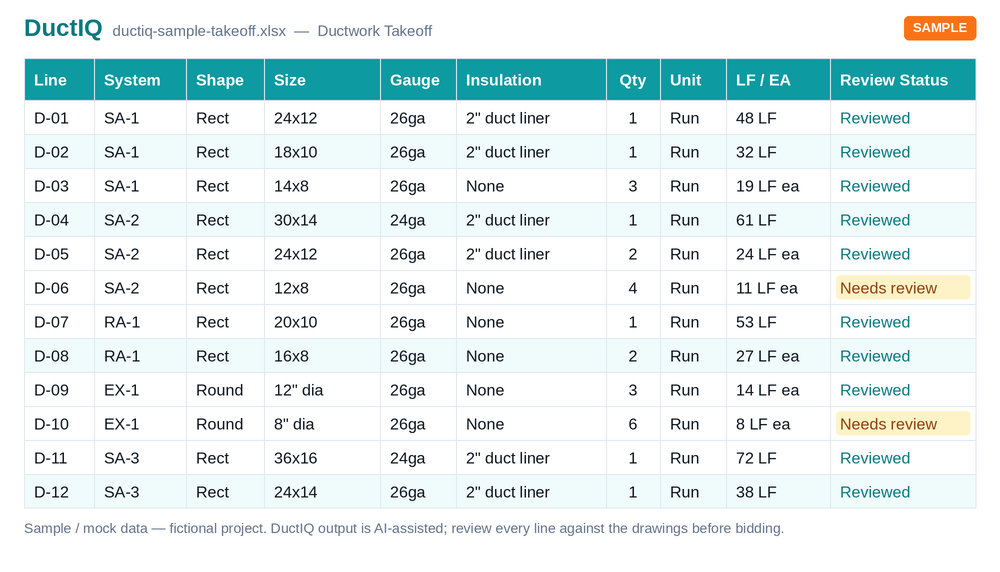
- Covered components: supply/return/exhaust duct by size (round and rectangular apart), elbows, tees and taps, reducers and transitions, RTUs, VAV boxes, diffusers and grilles from the schedules — with SMACNA-aware gauge and sheet-metal pounds per line.
- Estimator review built in: every line carries a Review Status; low-confidence reads are flagged with the reason (unreadable scale, missing size callout) and queued first, so the audit is targeted, not a re-measure.
- Export: one click to Excel (.xlsx) or CSV — system, shape, size, gauge, insulation, quantity, linear feet — plus separate Fittings and Equipment tabs.
Download the sample takeoff (Excel)Download the CSV version
Three ways to run a mechanical takeoff, side by side
The honest comparison is not tool-vs-tool marketing — it is who does the measuring and what comes out the other end:
| Step | By hand (scale + spreadsheet) | General takeoff tool + AI assist (e.g. PlanSwift) | DuctIQ |
|---|---|---|---|
| Measure duct runs | Scale and tally every run | Click or auto-measure lines — you still interpret them | Runs traced from the PDF at scale, sizes applied |
| Classify systems | You track SA/RA/EA as you go | You assign systems to measurements | Separated automatically per run |
| Count fittings | Eyeball and tally | Count tools assist; types are yours to assign | Typed counts derived from the traced runs |
| Equipment schedules | Read and re-key | Read and re-key | Read and reconciled into the takeoff by tag |
| Know what to double-check | Your own discipline | Your own discipline | Low-confidence lines flagged with reasons |
| Get to Excel | It already is — you typed it | Export what you organised | Structured export, bid-ready columns |
General tools with AI assists (PlanSwift's Takeoff Boost among them) genuinely speed up the clicking; the interpretation stays manual. DuctIQ moves the interpretation into the engine and your time into review.
Start your free takeoffOr download a real sample takeoff first
What mechanical takeoff means in practice
Mechanical takeoff is the quantity survey for the mechanical scope of a project. On an HVAC bid that means measuring the ductwork — supply, return, and exhaust — by size, counting the fittings, and listing the equipment from the schedules, then turning all of it into priceable quantities for material, fabrication, hangers, and insulation.
General mechanical takeoff packages try to cover every mechanical trade with one measuring tool. That breadth is also the limit: the tool measures whatever you point it at, but it does not know a return from a supply, a tee from an elbow, or how to read an equipment schedule. Every measurement stays a manual decision. DuctIQ trades that breadth for depth on HVAC ductwork.
How DuctIQ runs a mechanical takeoff
The workflow is built to be short, because a busy estimator drops any tool with too many steps:
- Upload the mechanical PDF drawing set — a single sheet or a full multi-page set.
- DuctIQ classifies the sheets and finds the ductwork, ignoring the architectural and structural backgrounds.
- Supply, return, and exhaust runs are measured in linear feet against the sheet's own scale, with round handled apart from rectangular.
- Fittings are counted and equipment is read from the schedules into the same takeoff.
- Every line is shown for review, with low-confidence items flagged so you check them.
- Export the reviewed takeoff to Excel or CSV, straight into your bid sheet.
Why trade-specific beats general-purpose
A general construction takeoff tool will measure duct if you trace it, but it cannot classify it, count fittings as distinct items, or lift equipment from a schedule. Those are exactly the tasks a mechanical estimator re-keys by hand. DuctIQ does only HVAC mechanical, so the output is already bid-ready: quantities grouped by system and size, fittings counted, equipment listed by tag, and fabrication detail where you need it.
Need fab-ready output too? DuctIQ produces shop drawings with SMACNA-aware gauge, material, and seam callouts, and clearly labels the SMACNA minimum gauge when a drawing does not specify one. The same takeoff that feeds the bid can feed the shop.
Where mechanical takeoff software pays off
The return shows up on repetitive, count-heavy mechanical work: a multi-storey building with the same core stacked floor to floor, a school addition full of branch runs, a tenant fit-out with a short bid window. Those are the jobs where hand-measuring every duct run costs an estimator an evening and where a missed branch quietly changes the number.
DuctIQ turns that into an upload, a review, and an export — moving the estimator's time from measuring duct to pricing it. It fits the solo estimator turning around more bids and the multi-estimator shop that wants every mechanical takeoff to look the same no matter who ran it.
Mechanical takeoff vs mechanical estimating
Takeoff and estimating are two halves of the same job, and it helps to keep them separate. The takeoff is the measured quantity — how much duct, how many fittings, which equipment. The estimate is the priced bid — unit costs, productivity rates, labour, and margin applied to those quantities.
DuctIQ is takeoff software: it produces the accurate, reviewable quantities, then exports them cleanly to the spreadsheet or estimating system where you build the price. If you are weighing the broader estimating workflow, the mechanical estimating and HVAC estimating pages cover how the takeoff feeds the bid.
Mechanical estimating software, explainedHVAC estimating software overview
Run your first takeoff free
Upload a mechanical PDF and get a reviewable ductwork, fittings, and equipment takeoff you can export to Excel. No credit card to try your first drawing.
Start your free takeoff Download a sample takeoff See pricingNew to AI takeoff and want a hand? Send us your first drawing and we'll help you review the output, or book a 1:1 walkthrough.
Related HVAC takeoff guides
Frequently asked questions
What is a mechanical takeoff?
A mechanical takeoff is the quantity survey for the mechanical scope of a project. For HVAC that means measuring the ductwork by size, counting fittings, and listing equipment from the schedules, then turning it into priceable quantities for material and fabrication. It is the basis of a mechanical bid.
Does DuctIQ cover all mechanical trades?
No, and that is deliberate. DuctIQ focuses on HVAC ductwork — supply, return, and exhaust duct, fittings, and equipment — rather than spreading across piping and plumbing. That focus is why the output is already classified, counted, and bid-ready instead of raw measurements.
How is mechanical takeoff different from estimating?
The takeoff is the measured quantity — how much duct, how many fittings, which equipment. The estimate is the priced bid built on top, applying unit costs and productivity rates. DuctIQ produces the takeoff and exports it to the spreadsheet or system where you build the estimate.
Can I export the mechanical takeoff to Excel?
Yes. Every takeoff exports to Excel or CSV with structured columns — system, shape, size, gauge, insulation, quantity, and unit — so your formulas and unit costs attach directly with no re-keying.
Does it handle multi-page mechanical drawing sets?
Yes. DuctIQ classifies the sheets in a set, processes the mechanical plan sheets, and reconciles the results into one takeoff, ignoring the architectural and structural backgrounds.
Is DuctIQ accurate enough to bid a mechanical job from?
DuctIQ is AI-assisted and built to be reviewed, not trusted blindly. It does the reading and measuring and flags low-confidence items; a qualified estimator confirms the quantities against the drawings before submitting. That review step is part of the workflow.