Ductwork Takeoff Software for Faster HVAC Estimates
Try AI Takeoff Free
No credit card · Upload a PDF in 10 seconds · Runs in your browser on Mac or Windows
Try AI Takeoff FreeSee an AI Takeoff in 10 Seconds
The sample is a real DuctIQ takeoff workbook: no signup. Plans and credits are on the pricing page.
DuctIQ is ductwork takeoff software focused on the part of a mechanical bid that takes the longest: measuring duct. Upload the HVAC drawing and DuctIQ traces the supply, return, and exhaust runs, measures them in linear feet at the drawing's scale, and rolls them up by size — so a takeoff that used to eat an evening of scaling and tallying comes back ready to review.
If you are comparing ductwork estimating software, or weighing whether a tool beats your current spreadsheet, this page lays out exactly how DuctIQ does a duct takeoff, what it covers, what it does not, and what to check before you bid.
What is a ductwork takeoff?
A ductwork takeoff is the process of measuring every duct run on a set of mechanical drawings and turning it into quantities you can price: linear feet of supply, return, and exhaust duct by size, plus the fittings and equipment that go with them. It's the foundation of an HVAC bid — material, fabrication hours, hangers, and insulation all scale off the duct quantities — and traditionally it's done by hand, scaling each run off the drawing and tallying it size by size.
Done manually, a ductwork takeoff is slow and easy to get wrong on a big set. Done with software, the drawing is read and measured automatically and the estimator reviews the result. DuctIQ is the second kind: it produces the duct, fitting, and equipment quantities from your PDFs, so the takeoff becomes a review-and-export step instead of an evening of scaling.
From PDF to Excel in three steps
The whole point of ductwork takeoff software is speed without losing control of the number. DuctIQ keeps the path from drawing to bid sheet to three steps, and processing runs on its own at minutes per sheet, so the bottleneck moves from scaling duct to pricing it.
- 1. Upload the mechanical PDF — a single sheet or a full multi-page set.
- 2. DuctIQ auto-detects the ductwork and measures supply, return, and exhaust at the drawing's scale, counts fittings, and pulls equipment from the schedules.
- 3. Export to Excel or CSV — structured columns drop straight into your bid sheet, with no re-keying.
Start your free takeoffOr download a real sample takeoff first
Reviewable line items and a built-in audit trail
Fast is only useful if you can trust it. Every quantity DuctIQ returns is a line item you can see, each with a confidence level, and low-confidence runs are flagged for a second look rather than buried. Each line traces back to the sheet it came from, so a reviewer — or a GC questioning a number — can follow any quantity to its source. That per-line status and traceability is the audit trail behind the takeoff: you get the speed of automation and a paper trail you can defend.
Who ductwork takeoff software is for
DuctIQ is built for the people who actually price sheet metal: HVAC and mechanical estimators, sheet metal subcontractors, and design-build shops that bid ductwork from mechanical PDFs. If you receive a plan set, scale the duct, count fittings, and re-key it all into a bid sheet, this is the workflow it replaces.
It fits a solo estimator trying to turn around more bids without working later, and a multi-estimator shop that wants every takeoff to look the same no matter who ran it. It is not a general-trades takeoff package stretched to cover HVAC — it only does mechanical, which is why the output already speaks in duct sizes, linear feet, fitting counts, and equipment tags.
Why ductwork is the hardest part to take off
Duct is everywhere on a mechanical plan and it changes size constantly. A single trunk might step down through four or five sizes, branch repeatedly, turn with fittings, and carry different systems on the same sheet. Measuring all of that by hand means scaling every segment and keeping a running tally per size — exactly the kind of repetitive work where small errors creep in.
Get the duct quantities wrong and the whole bid is wrong, because duct linear feet drive material, fabrication hours, hanger counts, and insulation. A spreadsheet is honest but slow; a generic on-screen tool is faster to click but still leaves every measurement as a manual decision. Ductwork takeoff software earns its place only if it removes that manual interpretation without hiding it.
The DuctIQ ductwork takeoff workflow
The workflow is deliberately short, because every extra step is a place a busy estimator drops the tool:
- Upload your mechanical PDF drawing set — a single sheet or a full multi-page set.
- DuctIQ classifies the sheets and finds the ductwork, ignoring the architectural and structural backgrounds.
- Each supply, return, and exhaust run is measured in linear feet against the sheet's own drawing scale.
- Duct is grouped by system and size; fittings are identified alongside the straight runs.
- Every line is shown for review, with low-confidence items flagged so you check them rather than trust them blindly.
- Export the reviewed takeoff to Excel or CSV and drop it straight into your bid sheet.
Duct, fitting, and equipment coverage
A duct takeoff is more than straight runs. DuctIQ covers the three buckets a mechanical estimator actually prices:
- Rectangular duct measured in linear feet by size, separated by system (SA, RA, EA).
- Round and spiral duct handled distinctly from rectangular, by diameter, so the quantities are usable for buying and fabrication.
- Fittings — elbows, transitions, tees, takeoffs — identified and counted alongside the straight duct.
- Equipment pulled from the drawing's schedules with tags, so RTUs, fans, VAV boxes, and diffusers are listed, not missed.
- Fabrication detail where you need it: gauge, material, and seam callouts, with the SMACNA minimum gauge shown and clearly labelled when the drawing does not specify one.
Measurable use cases
Where ductwork takeoff software pays off is repetitive, count-heavy work: a four-storey office with the same core stacked floor to floor, a school addition with dozens of branch runs, a tenant fit-out where the bid window is short. Those are the jobs where hand-scaling every run costs an estimator an evening and where a transposed size quietly changes the number.
DuctIQ turns that into an upload, a review, and an export. The estimator's time moves from counting duct to pricing it — checking productivity rates, supplier pricing, and bid strategy — which is the part of estimating that actually wins or loses work.
How DuctIQ compares to manual tracing and spreadsheets
We will not pretend a spreadsheet is useless — plenty of good bids have been built in one, and for a tiny single-system job a spreadsheet is fine. The difference shows up at volume. Tracing every run with a scale wheel or a generic measure tool, then re-keying each quantity into Excel, is two passes over the same data and two chances to transpose a number.
DuctIQ does the reading and measuring in one pass and hands you a structured list, so the only manual step is review. The honest framing: DuctIQ is faster and more consistent than manual tracing for HVAC ductwork, but it is AI-assisted, not infallible — which is exactly why every line is reviewable and low-confidence items are surfaced rather than buried.
What separates DuctIQ from a generic or newer takeoff tool
New takeoff tools appear regularly, and most general-trades packages will measure duct if you point them at it. The difference that holds up over time is depth on the one trade: DuctIQ only does HVAC mechanical, so it reads a drawing the way an estimator does — supply, return, and exhaust as separate systems, round handled apart from rectangular, fittings counted rather than lumped into linear feet, and equipment lifted from the schedules by tag.
That focus is also why the output is bid-ready rather than raw measurements: quantities grouped by system and size, fabrication-ready gauge and seam callouts with the SMACNA minimum labelled when a drawing is silent, a per-line review with low-confidence runs flagged, and a clean Excel/CSV export. A generic tool can measure; the work a mechanical estimator actually re-keys — classification, fittings, equipment, gauge, export — is where a purpose-built tool stays ahead.
Excel / CSV export built for your bid sheet
Estimators price in Excel, so the takeoff is only useful if it lands there cleanly. DuctIQ exports the reviewed duct, fitting, and equipment lines to Excel or CSV with structured columns — system, shape, size, gauge, insulation, quantity, and unit — so your formulas and unit costs attach directly instead of you re-typing quantities off a screen.
What the export actually looks like
No mystery about the deliverable — here is the real Ductwork sheet from the sample export, the same file the download buttons give you. Each line is one quantity an estimator prices, with its Confidence level carried right in the sheet so flagged items are obvious.
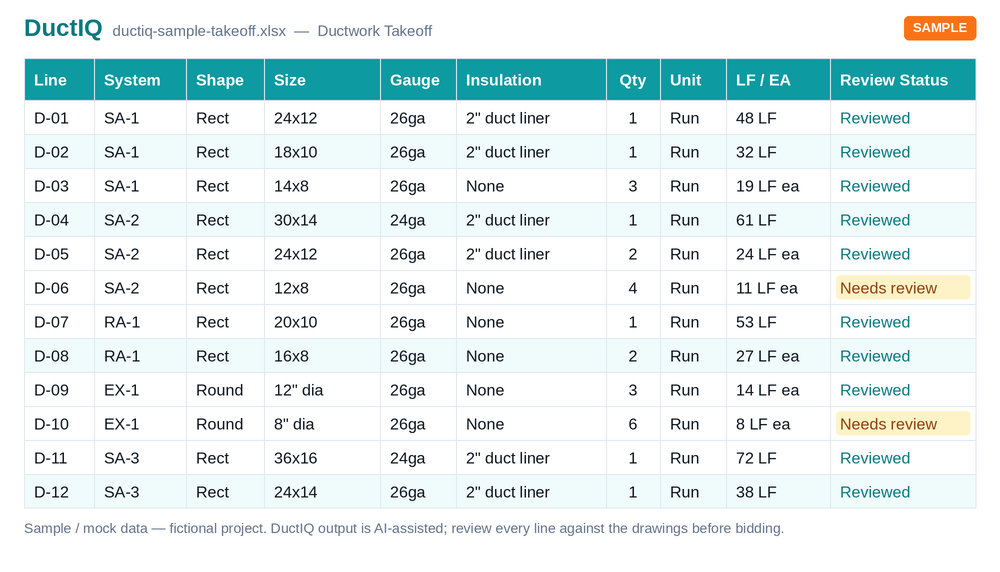
- What's included: the Ductwork sheet lists every duct run, fitting and roof curb with system, shape, size, length, gauge, lining, pressure class and a Confidence level per line, next to the Equipment, GRD, Dampers, Piping, Controls, Demolition and Summary sheets.
- Units, spelled out: rectangular and round duct in linear feet (LF) by size, fittings and equipment counted as each (EA) — no unit guesswork in your formulas.
- How to import: open the .xlsx directly, or drop the .csv into PlanSwift, Bluebeam, or your own bid sheet — structured columns map straight to your unit-cost rows with no re-keying.
Download sample export (Excel)Download sample (CSV)
How to review the takeoff
Because this comes up whenever automated takeoff is weighed against a human-checked one: DuctIQ's QA is built in and instant. The audit trail above becomes a short workflow, so reviewing is targeted rather than a full re-check.
- A Confidence level on every line (Confirmed, Review or Flagged).
- Low-confidence runs flagged with a reason, grouped into a review queue so you check them first.
- Each quantity traces to its source sheet for verification.
- You confirm or adjust before exporting; nothing is auto-submitted.
Fast enough to answer the 10-minute claim, honest about what fast means
Every AI takeoff tool now leads with a clock: takeoffs in ten minutes, plans in under fifteen. Here is the honest version for DuctIQ. Processing runs in the background at minutes per sheet, so a multi-sheet set takes longer, and dense or scanned sheets longer still. But processing time is only half of the number that actually matters.
The half nobody puts on a landing page is review. A headline capture percentage tells you a tool measured most of the drawing; it does not tell you which lines to trust on your job. DuctIQ answers accuracy differently: instead of a single figure, every quantity comes back as a line with a Confidence level, low-confidence runs are flagged with a reason, and each line traces to the sheet it came from. The time that counts is time to a takeoff you can defend, and that includes the review a speed claim quietly leaves out.
- Processing: minutes per sheet, in the background (multi-sheet, dense or scanned sets take longer).
- Then review, not blind trust: low-confidence runs surfaced for a second look, not folded into a total.
- Accuracy you can audit: every line traces to its source sheet, so any quantity is defensible to a GC.
- Then export: structured Excel/CSV straight into your bid sheet.
How AI HVAC estimating actually works
What to check before you bid
DuctIQ is a tool for a qualified estimator, not a replacement for one. Before a DuctIQ takeoff goes into a submitted bid, run the same checks you would on any takeoff:
- Confirm the drawing scale DuctIQ read matches the title-block scale — spot-check one known dimension.
- Review every line flagged "Needs review"; these are the runs or fittings DuctIQ was not confident about.
- Sanity-check the largest trunk sizes and total LF per system against your feel for the job.
- Verify equipment counts against the schedule, especially where tags repeat across floors.
- Confirm gauge and insulation against the project specification, not just the drawing notes.
See a real sample takeoff first
You should not have to sign up to see what you get. Download a real sample takeoff — the same Excel and CSV a finished DuctIQ run produces, on a clearly-labelled fictional project — and judge the deliverable before you upload anything.
Download sample takeoff (Excel)Download sample (CSV)
How AI does a duct takeoff
The AI replaces the measuring, not the estimator. The steps that used to be an evening of scaling become a short, automated pass:
- Upload the mechanical PDF — vector or scanned, single sheet or full set.
- Computer vision classifies the sheets, finds the ductwork, and traces supply, return, and exhaust runs at the drawing's scale.
- AI-powered sheet metal counting tallies fittings — elbows, tees, transitions, takeoffs — as distinct items.
- Equipment and air devices are read from the schedules by tag into the same takeoff.
- Every line comes back with a confidence level, low-confidence runs flagged for a second look.
- Export the reviewed takeoff to Excel or CSV for your bid sheet.
AI-assisted, not a black box
The honest framing for any AI takeoff tool: AI-assisted means reviewed, not infallible. DuctIQ is accurate enough to start a bid from and built so you verify before you submit. Every quantity is a visible line item, each traces back to the sheet it came from, and low-confidence items are surfaced for the estimator instead of hidden inside a total.
That traceability is what separates a usable AI duct takeoff from a number you cannot defend. When a reviewer or a GC questions a quantity, you can follow it to its source run on the drawing — the speed of automation with a paper trail behind it.
Run your first takeoff free
Upload a mechanical PDF and get a reviewable ductwork, fittings, and equipment takeoff you can export to Excel. No credit card to try your first drawing.
Built by a practicing P.Eng and principal of an Ontario mechanical contracting firm, for the estimators at that firm.
Start your free takeoff Download a sample takeoff See pricingNew to AI takeoff and want a hand? Send us your first drawing and we'll help you review the output, or book a 1:1 walkthrough.
Related HVAC takeoff guides
Further reading
- How AI Reads a Mechanical Drawing for Duct Takeoff
- A Checklist for Reviewing an AI Ductwork Takeoff Before You Bid
Frequently asked questions
How long does a ductwork takeoff take?
Processing takes minutes per sheet and runs in the background, then you review the line items and export. Larger, denser or image-only (scanned) sets take longer. The number that actually matters is time to a takeoff you trust, which is why processing is followed by a quick review rather than a blind hand-off.
What formats can I export — Excel or CSV?
Both. The full takeoff — duct, fittings, and equipment — exports to Excel (.xlsx) or CSV with structured columns (system, shape, size, gauge, insulation, quantity, unit), so it drops into your pricing workbook or imports into another estimating system with no re-keying. You can filter to just the ductwork lines in your bid sheet.
Does DuctIQ measure both round and rectangular duct?
Yes. Both rectangular and round/spiral duct are detected and measured, and round runs are handled distinctly from rectangular (by diameter) so the quantities are usable for buying and fabrication.
Can I review and adjust the duct quantities before bidding?
Yes. Every duct line is shown for review with a status and traces back to its source sheet, so an estimator can verify size and length and adjust anything before the numbers go into a bid. You stay the final authority on the takeoff.
Is DuctIQ accurate enough to bid from?
DuctIQ is AI-assisted and built to be reviewed, not trusted blindly. It does the reading and measuring and surfaces low-confidence items; a qualified estimator confirms the quantities against the drawings before submitting. That review step is part of the workflow, not an afterthought.
What is a ductwork takeoff?
It's the measurement of all the duct on a set of mechanical drawings, turned into priceable quantities — linear feet of supply, return, and exhaust duct by size, plus fittings and equipment. It's the basis of an HVAC bid, since material and fabrication hours scale off the duct quantities.
How do you do a ductwork takeoff?
Manually: set the drawing scale, measure each duct run, tally linear feet by size, count fittings, and read equipment off the schedules into a bid sheet. With DuctIQ: upload the PDF, let it measure and classify the duct, review the flagged lines, and export to Excel or CSV — the same result without hand-scaling every run.
What is AI duct takeoff?
AI duct takeoff is software that reads a mechanical drawing and measures the ductwork automatically instead of you tracing every run by hand. DuctIQ uses computer vision to trace duct at the drawing's scale, AI counting for fittings, and schedule reading for equipment, returning a reviewable line-item takeoff.