Duct Fitting Takeoff Software
Linear feet get the attention, but fittings decide whether a sheet metal bid holds up. Every elbow, transition, tee, and tap is a fabricated piece with its own labour, and a takeoff that under-counts them by a handful per floor hands that cost straight to the shop. Counting them by hand — squinting at junctions across a multi-page mechanical set, tallying by type — is exactly the kind of repetitive, error-prone work estimators lose evenings to.
DuctIQ counts duct fittings for you, from the PDF, alongside the ductwork itself. Upload the mechanical drawing set and the fittings come back as typed, reviewable line items — elbows, tees and taps, reducers and transitions, offsets and drops — each one traceable to its sheet, ready to confirm and export to Excel with the rest of the takeoff.
Start your free takeoffSee pricing
No credit card — your first takeoff is free. Want proof first? Download a real sample takeoff — no signup.
Why fittings decide the bid
A duct run's cost is not evenly spread along its length — it concentrates at the fittings. Straight duct is fast to fabricate and hang; a mitred elbow, a bevelled transition, or a tap with a damper is bench time, and shop labour estimates are built on those piece counts. Two bids can agree on linear feet and still land thousands of dollars apart because one counted forty-one elbows and the other counted thirty-three.
Fittings are also where manual counting fails quietly. A missed run of duct is visible — a gap in the plan you'd catch on review. A missed tap is a small symbol at a junction on a dense sheet, identical to the ninety others you did count. Nothing looks wrong; the number is just short. That failure mode is precisely what a machine that never gets tired of junctions is for.
The fittings DuctIQ counts, by type
The takeoff returns fittings as their own typed line items, not a lump-sum "fittings" row, so pricing can treat each type at its real fabrication cost:
- Elbows — direction changes on rectangular and round runs, counted where the run turns.
- Tees and taps — branch connections off trunks, the easiest pieces to under-count by hand on a dense plan.
- Reducers and transitions — every size change along a run, which also drives the size-grouped duct footage either side of it.
- Offsets and drops — jogs around structure and connections down to air devices.
- Counts stay attached to their system (supply, return, exhaust) and duct size, so the fitting schedule prices the way the shop fabricates.
How counting from a PDF actually works
DuctIQ reads the mechanical plan at its drawing scale, traces the duct runs, and identifies fittings where the geometry demands them — a turn is an elbow, a branch junction is a tee or tap, a size change is a transition. Because the fittings are derived from the same traced runs as the linear footage, the two can't disagree: the takeoff never shows a size change without a transition or a branch without a tap.
Every detected fitting becomes a line item tied to its source sheet. That traceability matters at bid time — when a GC or your own senior estimator asks where forty-one elbows came from, each one points back to a location on a drawing, not to a marketing claim about accuracy.
Every count is a reviewable line, not a trust-me total
No automated count should go into a bid unaudited, so the review is built in. Fitting lines carry the same Review Status as duct runs: confident detections are listed for confirmation, low-confidence reads are flagged with the reason and grouped first, and you adjust any count before it exports. The audit takes minutes because it is targeted — you check the flagged junctions, not every junction on the set.
From counts to priced quantities in Excel
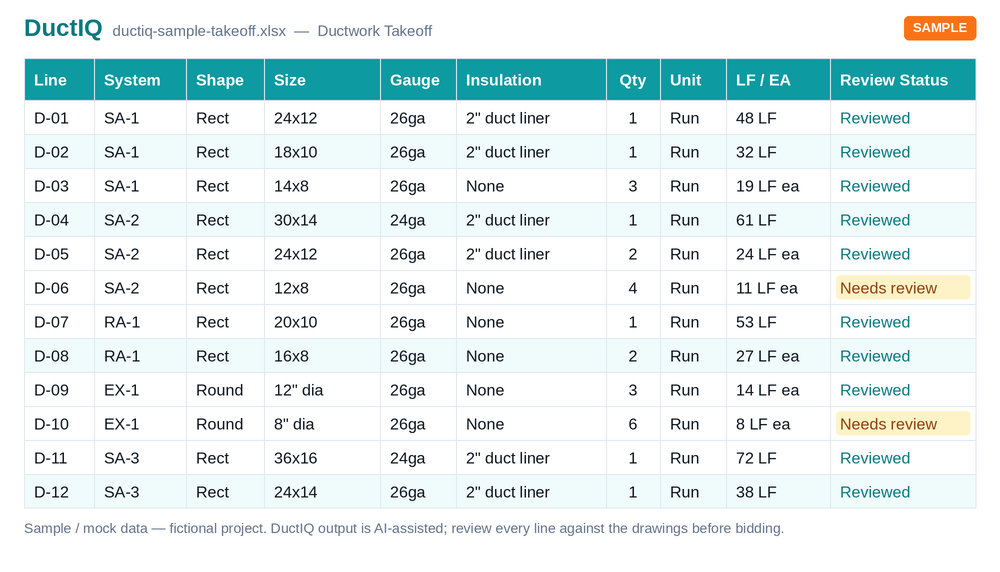
The fitting schedule exports with the rest of the takeoff in one click — Excel (.xlsx) or CSV with structured columns, fittings in their own section grouped by type, system, and size, next to the duct footage, equipment, and air devices. It drops into the pricing workbook you already use, with no re-keying and no proprietary format between you and your numbers.
Judge the format before creating an account — this sample is generated by the real export pipeline:
Download the sample takeoff (Excel)Download the CSV versionHow the export is structured
Fittings are one column of a complete mechanical takeoff
Fitting counting isn't a standalone tool — it rides on the same pass that measures the ductwork. One upload returns duct linear feet grouped by system and size, the typed fitting schedule, equipment and air devices pulled from the schedules, and SMACNA-aware gauge on every line (spec gauge when stated, labelled minimum when not). If the fittings are what you came for, the rest of the takeoff comes free.
Run it on one of your own drawings — the first takeoff is free, and the fitting counts are yours to check against however you count today.
Start your free takeoffThe full ductwork takeoff
Run your first takeoff free
Upload a mechanical PDF and get a reviewable ductwork, fittings, and equipment takeoff you can export to Excel. No credit card to try your first drawing.
Start your free takeoff Download a sample takeoff See pricingNew to AI takeoff and want a hand? Send us your first drawing and we'll help you review the output, or book a 1:1 walkthrough.
Related HVAC takeoff guides
Frequently asked questions
How does DuctIQ count duct fittings from a PDF?
It reads the mechanical plan at scale, traces the duct runs, and derives fittings from the run geometry — a turn is an elbow, a branch junction is a tee or tap, a size change is a transition. Each detected fitting becomes a typed line item tied to its source sheet, so counts and duct footage can never disagree.
Which fitting types does it count?
Elbows, tees and taps, reducers and transitions, and offsets and drops — each as its own typed line, grouped by system (supply, return, exhaust) and duct size, so pricing treats every type at its real fabrication cost rather than a lump-sum fittings row.
What if the AI miscounts a fitting?
You fix it before it matters: every fitting line carries a Review Status, low-confidence detections are flagged with the reason and grouped first, and you confirm or adjust counts before anything exports. Each line traces to its sheet, so checking a flagged junction takes seconds.
Does it count fittings on round and spiral duct?
Yes — fittings are detected on rectangular and round runs alike, wherever the traced geometry turns, branches, or changes size. Round-run fittings carry their diameter the same way rectangular ones carry their dimensions.
Do fittings export separately in Excel?
They export in their own section of the same workbook — typed fitting counts grouped by system and size in Excel (.xlsx) or CSV, alongside duct footage, equipment, and air devices. A sample export is downloadable on this page with no account.