AI HVAC Estimating Software for Faster Bid Work
DuctIQ uses AI to do the slow part of HVAC estimating — the takeoff — and gives the estimator back time for the parts that need judgement: pricing, productivity, and strategy.
Upload a mechanical drawing set and DuctIQ reads it, measures the ductwork, and pulls fittings and equipment into a structured takeoff you can review and export.
Start your free takeoffSee pricing
No credit card — your first takeoff is free. Want proof first? Download a real sample takeoff — no signup.
Where AI actually helps in estimating
Estimating is two jobs. The first is mechanical: read the drawings and measure everything. The second is judgement: decide how you will build it and what it should cost. AI is a poor substitute for the second and a strong tool for the first.
DuctIQ applies AI to the reading-and-measuring half. It classifies the sheets in a set, finds the ductwork, measures runs at scale, and reconciles fittings and equipment from the schedules — work that is rote but time-consuming when done by hand.
Reviewable, not a black box
The risk with any AI estimating tool is a confident wrong number. DuctIQ is built to avoid that. Every quantity comes back as a line item you can see and check, and runs the software is unsure about are surfaced for review instead of being silently included. The estimator stays the final authority on the bid.
A faster path from drawing to bid
The practical payoff is turnaround. A takeoff that took hours of manual scaling becomes an upload, a review, and an export. That lets a small shop bid more work without adding headcount, and lets a busy estimator spend the saved time sharpening the price rather than counting duct.
- Upload mechanical PDF drawings.
- AI reads the sheets and measures the ductwork.
- Fittings and equipment are pulled in automatically.
- Review the line items and adjust as needed.
- Export to Excel or CSV for pricing.
AI ductwork takeoff vs general AI takeoff tools
"AI takeoff" is becoming a checkbox on every general estimating platform — PlanSwift's Takeoff Boost is a fair example of a capable multi-trade tool adding an AI assist to a general measure workflow. That kind of AI speeds up the clicking: it helps you place measurements faster across any trade. It does not, on its own, know that a line is a 24x12 supply trunk, that a block in a schedule is an RTU, or that round and rectangular duct buy and fabricate differently.
DuctIQ's AI is built around mechanical structure rather than general geometry. It reads the mechanical PDF, separates supply, return, and exhaust, measures duct at scale by size, counts fittings, and pulls equipment from the schedules — so the takeoff comes back organised the way an HVAC estimator bids, not as a faster pile of generic measurements. If ductwork is the work, see exactly how DuctIQ measures it, or how it stacks up against PlanSwift specifically.
| Capability | General AI takeoff (e.g. PlanSwift Takeoff Boost) | DuctIQ |
|---|---|---|
| What the AI does | Speeds up placing measurements across any trade | Reads the mechanical drawing and measures the ductwork for you |
| HVAC structure (SA/RA/EA, sizes) | You organise it yourself after measuring | Returned grouped by system and size |
| Fittings & equipment | Counted and keyed from the drawing by hand | Fittings counted and equipment pulled from schedules |
| Round vs rectangular duct | Treated as generic geometry | Handled distinctly, by diameter and size |
| SMACNA-aware fabrication output | Not produced | Gauge, material, and seam callouts for the shop |
| Trades covered | Many (concrete, framing, finishes, mechanical…) | HVAC / mechanical ductwork only — on purpose |
A fair, workflow-level comparison. PlanSwift is a capable multi-trade platform; the difference is mechanical-specific AI, not effort.
How DuctIQ measures ductworkDuctIQ vs PlanSwift
The deliverable: a priceable Excel file
AI is only useful here if what comes out is something you can bid from. DuctIQ's output is a structured Excel (or CSV) file — duct grouped by system and size with gauge, insulation, quantity, and linear feet in their own columns, plus fittings and equipment — so the numbers map straight onto your unit-cost rows instead of being re-keyed. Below is the real export from the sample project.
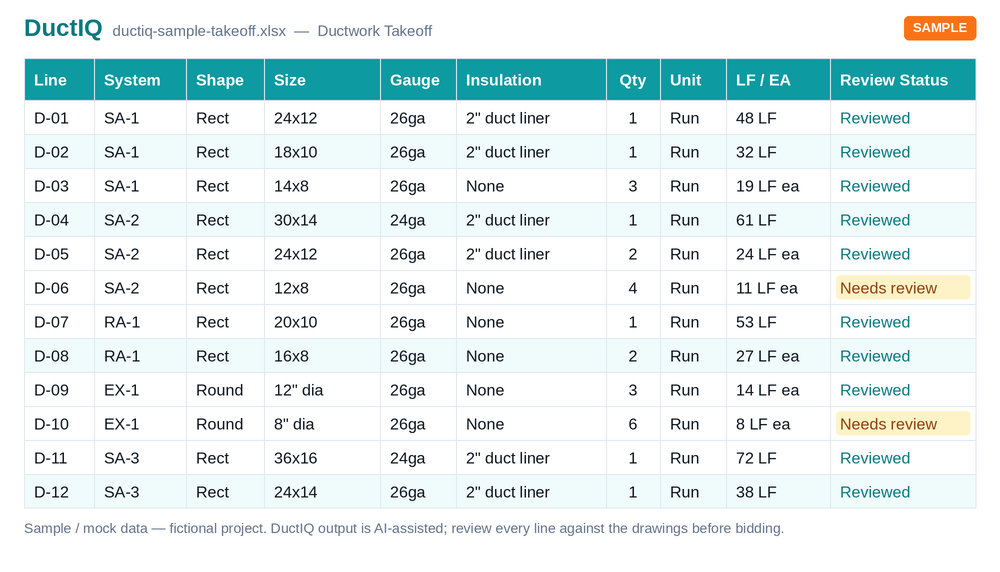
Download the sample export (Excel)Download sample (CSV)
A five-step review before you price
The point of an AI takeoff is a fast first pass a qualified estimator confirms — not a number you trust blindly. That review is quick because the tool tells you where to look. Before these quantities go into a bid, run five checks:
- Confirm the right mechanical plan sheets were measured — not demo, detail, or legend sheets.
- Verify the scale on any sheet flagged low-confidence; a wrong scale skews every length on it.
- Spot-check the largest trunks and one representative run per system, and that supply, return, and exhaust are separated.
- Reconcile equipment tags, diffuser counts, and fitting counts against the schedules.
- Clear the flagged low-confidence items, then export to Excel or CSV and move to pricing.
The full pre-bid review checklist
Run your first takeoff free
Upload a mechanical PDF and get a reviewable ductwork, fittings, and equipment takeoff you can export to Excel. No credit card to try your first drawing.
Start your free takeoff Download a sample takeoff See pricingNew to AI takeoff and want a hand? Send us your first drawing and we'll help you review the output, or book a 1:1 walkthrough.
Related HVAC takeoff guides
Further reading
Frequently asked questions
Will AI guess at quantities it cannot read?
No. When DuctIQ cannot confidently read a sheet's scale or a run, it flags those items for review rather than fabricating a number. The estimator decides how to handle them.
Can I export the takeoff to Excel or CSV?
Yes. Every takeoff exports to Excel (.xlsx) or CSV with structured columns — system, shape, size, gauge, insulation, quantity, and linear feet — so duct, fittings, and equipment drop straight into your pricing workbook or import into another estimating system with no re-keying.
What does the AI miss?
The usual weak spots are scale reads on scanned or photographed sheets, runs that disappear behind detail callouts, and schedules split across several sheets. DuctIQ surfaces those as flagged low-confidence line items instead of silently including a guess, so you review the handful that need judgement rather than re-checking everything. Feeding it clean vector PDFs keeps that list short.
How is DuctIQ's AI different from the AI in general takeoff tools?
General platforms like PlanSwift's Takeoff Boost add an AI assist to a multi-trade measure workflow — it helps you place measurements faster, but you still tell it what everything is. DuctIQ's AI is purpose-built for mechanical work: it reads the drawing, separates supply, return, and exhaust, measures duct by size, counts fittings, and pulls equipment from the schedules, so the takeoff arrives organised the way an HVAC estimator bids.
Does it work on drawings it has never seen?
Yes. DuctIQ reads the mechanical drawings you upload directly; it does not require a pre-built template of your specific project.
Is my drawing data kept private?
Your uploaded drawings are processed to produce your takeoff and tied to your account. They are not shared with other customers.
Does AI estimating replace pricing judgement?
No. DuctIQ produces the quantities. Pricing, labour productivity, and bid strategy remain with the estimator — which is where they belong.
How long does an HVAC takeoff take?
Most drawing sets are processed in minutes rather than hours, after which you review and export — the five-step review above is a short fraction of a manual takeoff. Larger, denser, or scanned sets take longer to process.