AI HVAC Takeoff Software That Reads Your Drawings
DuctIQ is AI HVAC takeoff software that does the measuring for you. Upload a mechanical PDF and the engine reads the sheets, traces the duct runs, counts the fittings and diffusers, and returns a reviewable, line-by-line takeoff — instead of you scaling and clicking every run by hand.
This is automated mechanical takeoff built specifically for ductwork and sheet metal, not a general measure tool with an "AI" button bolted on. The result comes back organised the way an HVAC estimator bids: grouped by system and size, with fittings and equipment already pulled from the schedules.
Start your free takeoffSee pricing
No credit card — your first takeoff is free. Want proof first? Download a real sample takeoff — no signup.
How the AI actually reads a drawing
Under the hood, DuctIQ combines computer vision with mechanical knowledge. Machine-learning blueprint tracing locates the ductwork on each plan sheet, follows linear duct runs at the drawing's scale, and separates supply, return, and exhaust so the footage lands in the right bucket. AI-powered sheet metal counting then tallies the fittings — elbows, tees, transitions, taps — and the equipment and diffuser schedules are read to pull RTUs, VAV boxes, and air devices into the same takeoff.
Because the model works from the mechanical structure of the drawing rather than generic geometry, it knows a 24x12 line is a supply trunk and that round and rectangular duct buy and fabricate differently — distinctions a general AI measure tool leaves you to sort out by hand.
- Computer vision traces linear duct runs at scale.
- Supply, return, and exhaust separated automatically.
- AI-powered sheet metal counting for fittings (elbows, tees, transitions).
- Diffusers, VAV boxes, and equipment read from the schedules.
- Round and rectangular duct handled distinctly, by size and diameter.
Reviewable by design — never a black box
The danger with any AI takeoff is a confident wrong number. DuctIQ is built so that can't slip through silently: every quantity comes back as a line item you can see and check, and anything the model is unsure about — a sheet whose scale it can't confirm, a run it couldn't fully trace — is surfaced for review rather than quietly included. The estimator stays the final authority on what goes into the bid.
That review-first design is why an AI takeoff is faster without being riskier: the machine does the rote reading-and-measuring, and you spend your time verifying the handful of items that need a human eye, not redrawing the whole set.
An AI measure tool built for ductwork, not everything
If you've searched for an AI measure tool, an AI takeoff tool, or a way to measure ductwork from a PDF automatically, the gap you've probably hit is that the generic ones measure shapes. They'll hand back lengths and areas, but they don't know a supply trunk from a return branch or a tap from a transition. DuctIQ is an AI measuring tool tuned to one trade — it measures HVAC ductwork in the terms an estimator bids, not as anonymous lines on a page.
So the output isn't a pile of dimensions to interpret afterwards. Duct comes back as linear feet by size and system, fittings as counts, and equipment from the schedules — automatic duct takeoff that lands ready to price. That's the difference between a ruler that happens to be automated and a takeoff that understands mechanical work.
AI HVAC takeoff vs a manual / legacy takeoff
A legacy takeoff — whether it's PDF markup or a general multi-trade estimating package — puts the measuring on you: you set the scale, click every run, key every fitting, and organise the totals yourself. The software is a faster ruler. An AI HVAC takeoff inverts that: the software reads the drawing and produces the structured quantities, and you review them.
| Step | Manual / legacy takeoff | DuctIQ AI takeoff |
|---|---|---|
| Find the HVAC sheets | You page through the set | Mechanical sheets classified automatically |
| Measure duct runs | Scale and click each run by hand | Computer vision traces runs at scale |
| Count fittings | Eyeball and tally manually | AI-powered sheet metal counting |
| Diffusers & equipment | Read schedules and key them in | Pulled from the schedules automatically |
| Organise by system & size | You sort it after measuring | Returned grouped by SA/RA/EA and size |
| Export for pricing | Rebuild the list in Excel | One-click Excel / CSV export |
A workflow-level comparison: the difference is who does the measuring, not effort. The estimator still owns pricing and judgement.
Download a real sample takeoffDuctIQ vs legacy takeoff tools
Built for ductwork and sheet metal specifically
General estimating platforms cover every trade and, by necessity, treat duct as generic lines. DuctIQ does one trade deeply. The automated mechanical takeoff understands gauge and seam implications, keeps round and rectangular duct on their own footings, and produces SMACNA-aware callouts a shop can actually fabricate from. For a sheet metal contractor, that focus is the whole point — the takeoff arrives in the shape of the bid, not as a pile of measurements to reinterpret.
Because several AI tools now claim the same vocabulary, here is what those words mean concretely in DuctIQ, each backed by a page you can inspect: gauge is resolved per run from the spec or the labelled SMACNA minimum, with pounds from published lb/ft² tables; fittings are typed counts derived from the traced runs themselves; and the export is a structured, documented Excel/CSV — not a screenshot claim.
SMACNA gauge & weights, in detailHow fittings are countedCompared against the newest duct-native rival
See the export the AI produces
An AI takeoff is only as useful as the file it hands back. This is the actual ductwork tab from the sample export — the same structured Excel/CSV the engine produces, with the AI's per-line review status baked into the sheet so you can see at a glance what to double-check.
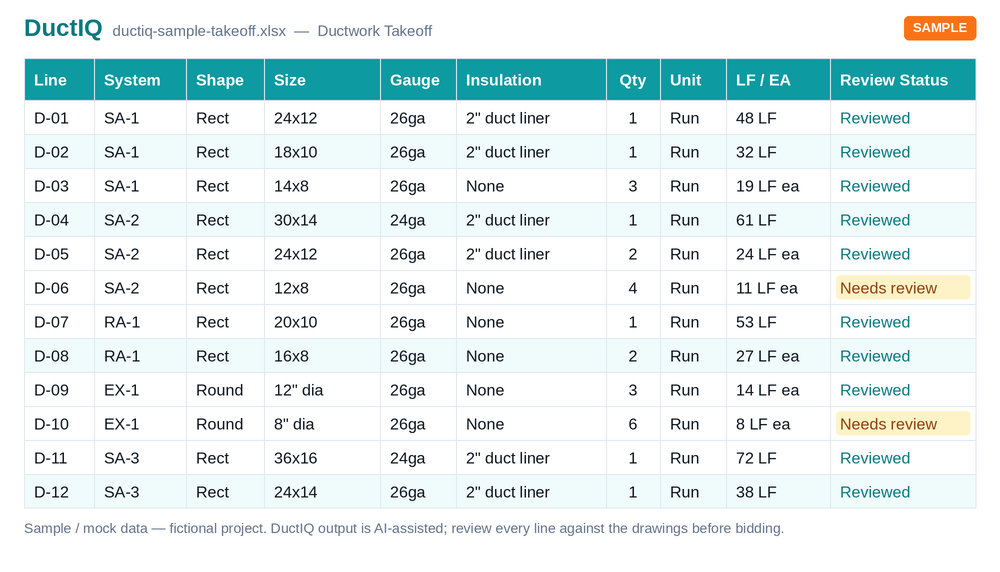
- What's included: a row per duct run plus separate Fittings and Equipment tabs — system, shape, size, gauge, insulation, quantity, and the AI's review status on every line.
- Units, no conversion: duct in linear feet (LF) by size; fittings and equipment as each (EA), so your unit costs attach directly.
- How to import: open the .xlsx, or load the .csv into PlanSwift, Bluebeam, or your own bid sheet — the columns line up with your pricing rows, no re-keying.
Download sample export (Excel)Download sample (CSV)Full column-by-column export documentation
Run your first takeoff free
Upload a mechanical PDF and get a reviewable ductwork, fittings, and equipment takeoff you can export to Excel. No credit card to try your first drawing.
Start your free takeoff Download a sample takeoff See pricingNew to AI takeoff and want a hand? Send us your first drawing and we'll help you review the output, or book a 1:1 walkthrough.
Related HVAC takeoff guides
Further reading
- How AI Reads a Mechanical Drawing for Duct Takeoff
- How Accurate Is AI HVAC Takeoff Software?
- How Long Does an HVAC Takeoff Take?
Frequently asked questions
What does the AI actually do to my drawing?
It reads the mechanical PDF with computer vision: it classifies the HVAC sheets, traces the duct runs at the drawing's scale, separates supply/return/exhaust, counts fittings, and reads the equipment and diffuser schedules — then returns all of it as reviewable line items.
Does DuctIQ output SMACNA-compliant duct weights and gauges?
Yes, and it shows its work. Gauge is resolved per run — from the project specification when the drawings state it, and from the SMACNA low-pressure minimum tables when they don't, labelled as a minimum so it is never mistaken for a verified spec. Sheet-metal pounds come from published galvanized lb/ft² weights by gauge, the same tables behind DuctIQ's free duct weight calculator, so any line's weight can be checked by hand.
Does it count fittings automatically — elbows, transitions, taps?
Yes, as typed counts rather than a lump sum: elbows, tees and taps, reducers and transitions, offsets and drops, each derived from the traced duct runs themselves — a turn is an elbow, a branch is a tap, a size change is a transition — so fitting counts and duct footage can never disagree. Diffusers and air devices are read from the schedules into the same takeoff.
Does it export to Excel/CSV, and what do the columns look like?
One click exports .xlsx or CSV with a row per duct run — system, shape, size, gauge, insulation, quantity, linear feet, and the AI's review status — plus separate Fittings and Equipment tabs with typed counts in EA. The sample export on this page is generated by the real pipeline, so you can open the exact columns before creating an account.
Will the AI invent quantities it can't read?
No. When DuctIQ can't confirm a sheet's scale or fully trace a run, it flags those items for review instead of fabricating a number. Nothing is silently included.
Does an AI takeoff replace the estimator?
No. It replaces the slow, rote measuring. Every number is reviewable, and the estimator stays the final authority on the bid — they just start from a structured takeoff instead of a blank drawing.
How is this different from AI HVAC estimating software?
Estimating spans takeoff plus pricing and bid judgement. This page is about the takeoff engine — the AI that reads and measures the drawing. DuctIQ produces the quantities; pricing and productivity stay with the estimator.
Can AI measure ductwork from a PDF?
Yes. DuctIQ reads the mechanical PDF, traces the duct runs at scale with computer vision, and returns the footage as linear feet by system and size — no manual scaling or clicking each run, and no pile of anonymous lengths to reinterpret like a general AI measure tool returns. Anything it can't confirm is flagged for review rather than guessed.