HVAC Takeoff Software for Mac, With Nothing to Install
Plenty of estimators work on a MacBook, and for years the takeoff software they needed did not. Several of the best-known takeoff and mechanical estimating tools are installed Windows applications. PlanSwift is the clearest example: ConstructConnect's own knowledge base says it cannot be installed directly on a Mac and must run under Boot Camp or in a Windows virtual machine such as Parallels. That means a Windows license, a virtual machine eating memory, and one more thing to keep updated just to measure ductwork.
DuctIQ runs in the browser. Safari or Chrome on macOS, Edge or Chrome on Windows: same product, same files, nothing to install. Upload a mechanical PDF, and the AI returns duct linear feet by system and size, fittings by type, air devices, equipment, SMACNA-aware gauge and pounds as reviewable line items, exported to Excel or CSV in one click.
Try AI Takeoff Free
No credit card · Upload a PDF in 10 seconds · Runs in your browser on Mac or Windows
Try AI Takeoff FreeSee an AI Takeoff in 10 Seconds
The sample is a real DuctIQ takeoff workbook: no signup. Plans and credits are on the pricing page.
Why Mac users hit a wall with takeoff software
Desktop takeoff tools were built when construction offices ran on Windows, and many still do. Their rendering engines, plugin systems and licensing are tied to Windows. For a Mac user the options have been a second computer, a dual-boot setup that does not exist on Apple Silicon, or a virtual machine running Windows on top of macOS. Each works in some form; none is what you would choose if the software simply ran where you already work.
Check any tool's current requirements before you buy, because vendors do add platforms. Several newer cloud tools, Beam AI among them, also run in a browser, so a Mac user has more choice in 2026 than before. The question is which browser-based tool produces the output your trade prices from.
What browser-based means in practice
- No download, installer, Windows license or virtual machine: open ductiq.ca and sign in.
- The same account works on your Mac at the office, a Windows PC at home, or a colleague's laptop.
- Heavy processing happens on DuctIQ's servers, so a large mechanical set does not slow down your machine.
- Updates arrive automatically; there is no version to fall behind on.
- Your takeoff exports as a standard Excel or CSV file that opens in Excel for Mac or Numbers.
Mac options side by side
Here is how the common routes compare for an estimator on macOS. Where a detail depends on the vendor's current release, the cell says what to verify:
| Route | What you need on a Mac | Duct-specific output |
|---|---|---|
| PlanSwift | Boot Camp or a Windows virtual machine (per ConstructConnect's knowledge base) | General-trade measurements you interpret |
| Installed mechanical estimating suites | Verify Mac and browser support with each vendor | Varies; often deep estimating databases |
| Other browser-based AI tools | A browser; verify output and pricing in a demo | Verify in a demo on your own set |
| DuctIQ | A browser: Safari, Chrome, Edge or Firefox | Duct LF by system and size, typed fittings, air devices, SMACNA gauge, pounds |
Platform requirements change; confirm with each vendor. DuctIQ's column is verifiable today with a free takeoff.
The takeoff, not just the platform
Running on a Mac is the entry ticket, not the reason to choose a tool. DuctIQ is built only for HVAC ductwork: it reads the sheets at scale, separates supply, return and exhaust, derives fittings from the traced runs, counts diffusers and grilles on the plans and resolves their tags against the schedules. Every quantity is a line item with a Review Status; low-confidence reads are flagged with a reason so you clear them first.
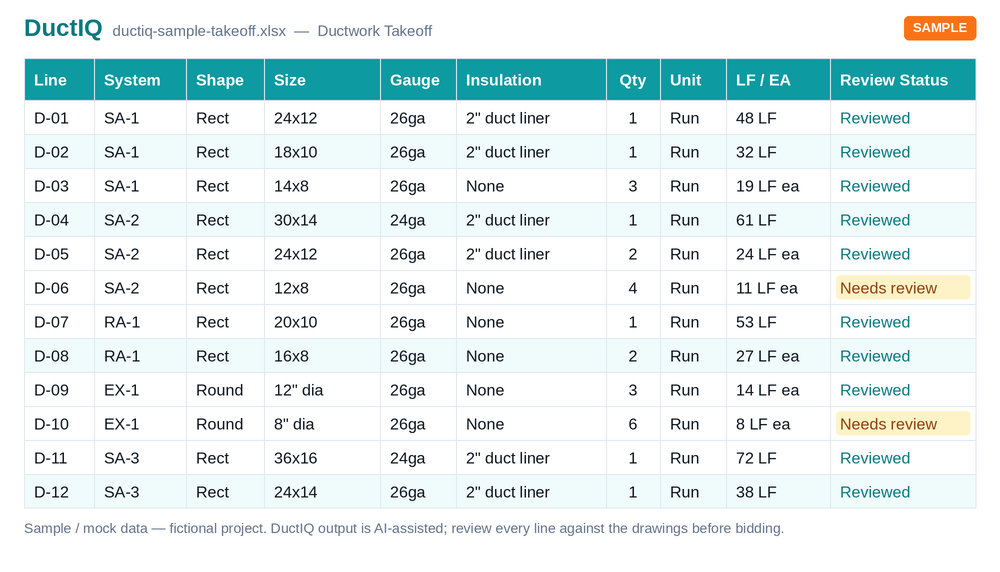
See the output before you sign up
The sample below comes from the real export pipeline and opens in Excel for Mac or Numbers. No account needed:
Download the sample takeoff (Excel)Download the CSV versionRun a free takeoff on your own drawing
Run your first takeoff free
Upload a mechanical PDF and get a reviewable ductwork, fittings, and equipment takeoff you can export to Excel. No credit card to try your first drawing.
Start your free takeoff Download a sample takeoff See pricingNew to AI takeoff and want a hand? Send us your first drawing and we'll help you review the output, or book a 1:1 walkthrough.
Related HVAC takeoff guides
Frequently asked questions
Is there HVAC takeoff software that runs natively on a Mac?
Browser-based tools run on a Mac without Windows. DuctIQ is one: it runs in Safari, Chrome, Edge or Firefox on macOS with nothing to install, and returns a reviewable HVAC duct takeoff exported to Excel or CSV.
Can I run PlanSwift on a Mac?
Not directly. ConstructConnect's knowledge base says PlanSwift must run under Boot Camp or in a Windows virtual machine such as Parallels. Check their current system requirements before buying.
Does DuctIQ work on Apple Silicon Macs?
Yes. DuctIQ runs in the browser, so the processor does not matter: M-series and Intel Macs work the same. The AI processing happens on DuctIQ's servers.
Do I need Excel for Mac to use DuctIQ?
No. The export is a standard .xlsx or CSV file, which opens in Excel for Mac, Numbers or Google Sheets.
Is DuctIQ free to try on a Mac?
Yes. Your first takeoff is a free preview with no credit card, on any platform. Paid plans start at $29.99 CAD per month with per-sheet credits shown before each job runs.