An AutoBid SheetMetal Alternative for the Takeoff Step
Free preview takeoff
One sheet · About half the rows · CSV export · No credit card · Runs in your browser on Mac or Windows
Try a Free Preview TakeoffSee an AI Takeoff in 10 Seconds
The sample is a real DuctIQ takeoff workbook: no signup. Plans and credits are on the pricing page.
Trimble AutoBid SheetMetal is estimating software built for sheet metal contractors. Trimble's materials describe on-screen takeoff over PDF and CAD drawings, automatic fitting generation, pre-built assemblies and a large item database, with pricing and bid submittal in the same system. For a shop that prices every job inside AutoBid, that depth is a real strength.
This page is for the estimator whose slow step is still the takeoff itself. In AutoBid you trace each duct run on screen and the software builds the fittings as you go. DuctIQ reads the mechanical PDF and returns duct linear feet by system and size, fittings counted by type, air devices and equipment from the schedules, and spec-first gauge with the SMACNA minimum labelled. Every line is reviewable, then it exports to Excel or CSV. Below is a fair comparison.
What AutoBid SheetMetal is built for
AutoBid SheetMetal is a complete estimating system: takeoff, labour and material pricing, assemblies and the bid. Trimble highlights autofitting, converting rectangular duct to equivalent round sizes for alternate bids, and boxing an area of the drawing to copy a repeated item such as a rooftop unit hookup. It is sold as part of Trimble's AutoBid estimating subscription.
The takeoff is still drawn by the estimator. Verify current features, packaging and pricing directly with Trimble or your reseller, because they change.
On-screen takeoff vs a measured duct list
The difference is who does the measuring. In an on-screen takeoff the estimator clicks along every supply, return and exhaust run, and AutoBid fills in the fittings. That is accurate when done carefully, and it still takes hours on a dense mechanical set.
DuctIQ does the measuring step for you on HVAC drawings. It runs in any modern browser, there is nothing to install, and your first takeoff is a free preview (one sheet, about half the rows, CSV) with no credit card. Upload a mechanical PDF, review the lines it flags, and export a structured workbook. Detail sheets and schedules are used to resolve tags, not measured again.
Start your free preview takeoffOr download a real sample takeoff first
Side by side on the duct takeoff
Score both on the ductwork itself. Where a detail depends on your AutoBid setup, the cell says what to check:
| Capability | AutoBid SheetMetal (verify with Trimble) | DuctIQ (verifiable today) |
|---|---|---|
| What it is | Full sheet metal estimating system with pricing | Browser-based HVAC ductwork takeoff |
| Who measures | The estimator draws runs on screen; fittings are generated | DuctIQ measures duct and counts fittings from the PDF; you review |
| Fittings | Autofitting as runs are drawn | Fittings counted by type from the drawing |
| Gauge and weight | Driven by your database and assemblies | Spec-first gauge, SMACNA minimum labelled; pounds from published tables |
| Pricing and bid | Labour, material and bid inside AutoBid, its core strength | Quantities only; export to Excel or CSV for your pricing |
| Setup | Installed estimating system with item database | Nothing to install; runs in the browser |
Fair under uncertainty: AutoBid's pricing and autofitting are credited; setup-dependent cells say what to check.
Where the hours go on a duct bid
On a mechanical set heavy with ductwork, drawing the runs is the slow part: scaling the sheet, tracing supply, return and exhaust, and reading tags against the schedules. DuctIQ hands you a finished list to audit, with the low-confidence reads flagged first, so your time goes into checking rather than clicking.
Use it beside the estimating system you already price in
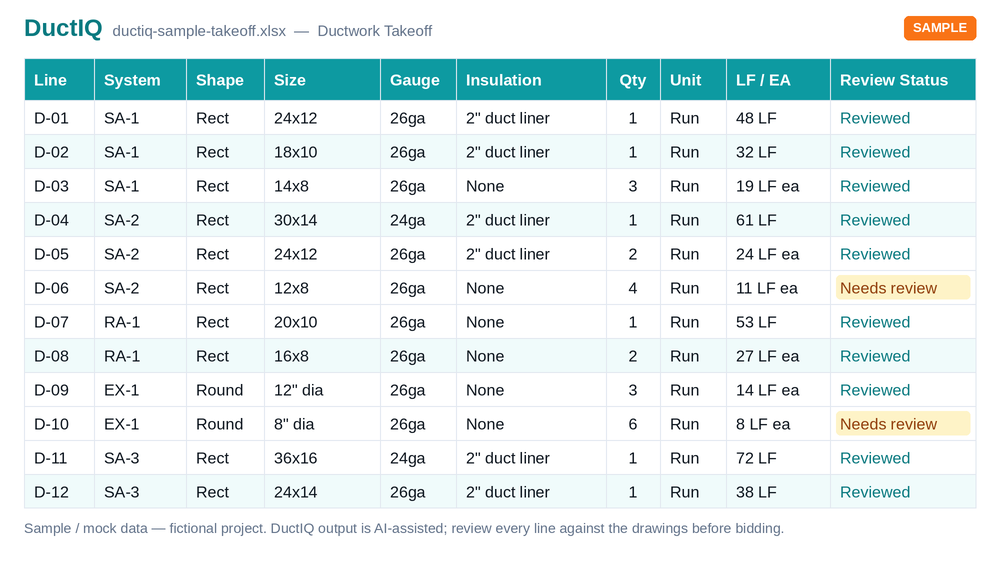
Because DuctIQ exports plain Excel and CSV, the duct quantities can feed whatever system you price in. The workbook has one sheet per category: Equipment, Ductwork with fittings, GRD for diffusers and grilles, Dampers, Piping, Controls and a Summary. Judge the file before creating an account:
Download the sample takeoff (Excel)Download the CSV versionHow the export is structured
Settle it on one real bid
Take a mechanical set you have already priced. Time the duct takeoff of it in AutoBid, and upload the same PDF to DuctIQ. Compare duct footage by system and size, fitting counts and air-device counts against numbers you trust, and note the time from opening the file to a usable quantity list. Keep whichever survives your audit.
Run a free preview takeoff on your own drawingSee pricing & plans
Start with a free preview takeoff
Upload a mechanical PDF and DuctIQ takes off one sheet as a free preview: about half the measured rows, with a CSV export, so you can judge the accuracy on your own drawing. No credit card. Paid plans return the complete takeoff with Excel.
Built by a practicing P.Eng and principal of an Ontario mechanical contracting firm, for the estimators at that firm.
Start your free preview takeoff Download a sample takeoff See pricingNew to AI takeoff and want a hand? Send us your first drawing and we'll help you review the output, or book a 1:1 walkthrough.
Related HVAC takeoff guides
Frequently asked questions
What is Trimble AutoBid SheetMetal?
AutoBid SheetMetal is Trimble's estimating software for sheet metal contractors. Its materials describe on-screen takeoff over PDF and CAD drawings, autofitting, assemblies, an item database, pricing and bid submittal. Verify current features and packaging with Trimble.
Does AutoBid SheetMetal measure ductwork automatically?
The estimator draws each run on screen and AutoBid generates the fittings along it. Ask Trimble which automated takeoff features apply to your sets.
Is DuctIQ a replacement for AutoBid SheetMetal?
Not for pricing. AutoBid is a full estimating system with labour, material and bid tools. DuctIQ is an HVAC ductwork takeoff that measures the duct for you and exports the quantities to Excel or CSV.
Can I use DuctIQ alongside AutoBid?
Yes. DuctIQ works from the mechanical PDF and exports Excel or CSV, so you can check or feed duct quantities into the system you price in.
Can I try DuctIQ before paying?
Yes. Your first takeoff is a free preview on your own drawing (one sheet, about half the rows, CSV) with no credit card, and the monthly plans are published on the pricing page.