Diffuser and Grille Takeoff Software for HVAC Estimators
Air devices are the most tedious count on a mechanical set. A single office floor can carry hundreds of square diffusers, linear slots, return grilles and exhaust registers, each tagged to a schedule, repeated across floors, and easy to miss or double count. Counting them by hand with a highlighter or a click counter is slow, and one missed floor changes the bid.
DuctIQ counts them for you. The AI reads each plan view, counts every diffuser, grille and register symbol, resolves its tag against the air-device schedule to get type, size, CFM and model, and returns a dedicated Diffusers and Grilles sheet in the Excel export. Each line has a Review Status, and the ones the AI was less sure of are flagged so you check those first.
Try AI Takeoff Free
No credit card · Upload a PDF in 10 seconds · Runs in your browser on Mac or Windows
Try AI Takeoff FreeSee an AI Takeoff in 10 Seconds
The sample is a real DuctIQ takeoff workbook: no signup. Plans and credits are on the pricing page.
How DuctIQ counts air devices
- Counts come from the plan views, where each device is drawn in place, not from details or legends.
- Each device tag (for example S1, D-101 or RG-2) is resolved against the schedule for type, face size, neck size, CFM and manufacturer reference.
- Typical-count notes such as "TYP. 6" are read, so a device drawn once but noted as repeating is counted correctly.
- Detail drawings that show how a diffuser is installed are treated as references and never counted again.
- Demolition sheets are set aside, so devices being removed on a renovation are not counted as new work.
- Devices filed under equipment in a schedule still land on the air-device sheet, so the GRD tab is never left blank.
What the air-device sheet looks like
The export groups every device on its own sheet, one line per tag and location, with the columns a GRD supplier quote or a labor estimate needs. This is the layout from the sample workbook:
| Tag | Type | System | Size (in) | CFM | Review status |
|---|---|---|---|---|---|
| D-101 | Linear slot diffuser | SA-1 | 24x4 | 120 | Reviewed |
| D-103 | Square diffuser | SA-1 | 12x12 | 80 | Reviewed |
| G-101 | Return grille | RA-1 | 24x12 | 200 | Reviewed |
| EG-102 | Exhaust grille | EX-1 | 10x10 | 110 | Needs review |
Rows from DuctIQ's sample takeoff. The full sheet adds throw, location and model reference.
Flags that point your eye at the risky counts
Automated counting is only useful if you can audit it quickly. DuctIQ highlights the lines that need a human: a symbol it read with low confidence, a size conflict, or a count raised from a "TYP." note that deserves a field check. Those rows are flagged with the reason and grouped first in the review screen, a tag that appears on a plan with no schedule row is called out in the takeoff notes, and every line traces back to its source sheet, so checking a count means opening one sheet rather than recounting the building.
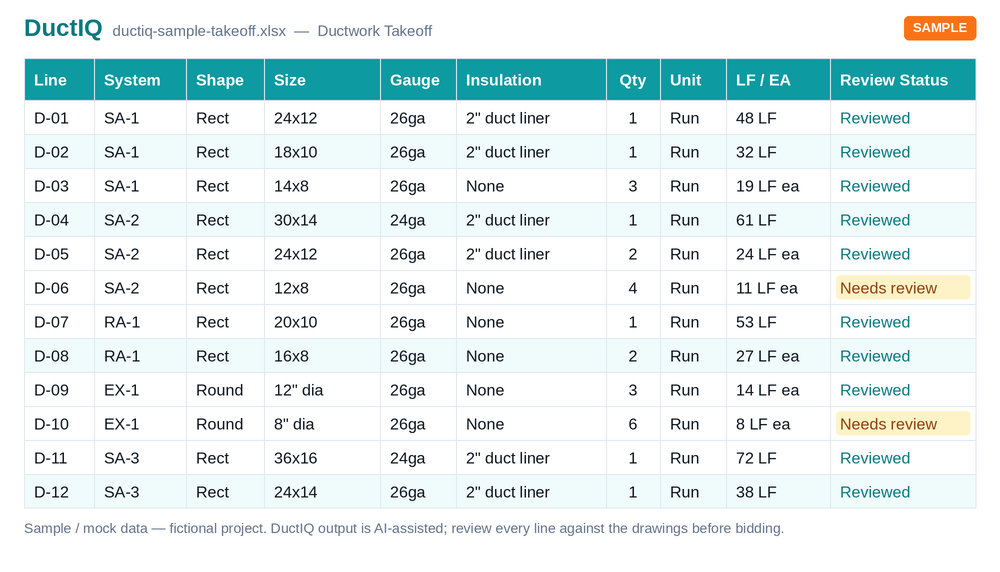
Part of the full duct takeoff
Air devices are counted in the same pass as the rest of the mechanical scope: duct linear feet by system and size, typed fittings, VAV boxes, equipment from the schedules, fire and smoke dampers, SMACNA-aware gauge and sheet-metal pounds. The flex runouts and collars that connect each diffuser appear in the fittings sheet, so the connections are not lost between two estimates.
Download the sample workbook to see the Diffusers and Grilles sheet next to the duct and fitting sheets. No signup needed:
Download the sample takeoff (Excel)Download the CSV versionCount the devices on your own drawing, free
Run your first takeoff free
Upload a mechanical PDF and get a reviewable ductwork, fittings, and equipment takeoff you can export to Excel. No credit card to try your first drawing.
Start your free takeoff Download a sample takeoff See pricingNew to AI takeoff and want a hand? Send us your first drawing and we'll help you review the output, or book a 1:1 walkthrough.
Related HVAC takeoff guides
Frequently asked questions
What is a diffuser and grille takeoff?
It is the count of every air device on a mechanical set (supply diffusers, return and exhaust grilles, registers), each resolved to its type, size, CFM and model from the schedule. Estimators use it to price the devices from a GRD supplier and to estimate installation labor.
Does DuctIQ count diffusers from the plans or from the schedule?
From the plans. Each device drawn on a plan view is counted; the schedule is used to resolve each tag to its type, size and model. Counting from the schedule alone misses devices, because schedules list types, not quantities.
Can DuctIQ tell supply diffusers from return grilles?
Yes. Devices are separated by type and by system (supply, return, exhaust) using the plan symbol, the tag and the schedule row, and each is listed with its system on the air-device sheet.
What happens when a diffuser tag is not in the schedule?
DuctIQ calls it out: the takeoff notes list any tag that appears on a plan with no schedule row, so you can decide whether it is a drawing error, a schedule omission or a device priced elsewhere.
Does the air-device count export to Excel?
Yes. Diffusers and grilles export on their own sheet of the Excel workbook (or a section of the CSV), next to the ductwork, fittings, VAV boxes and equipment sheets.